Introduction
Gold traders often face a difficult challenge: identifying suitable entry points while managing sudden price movements, changing spreads and market volatility. Manual XAUUSD trading also requires regular chart monitoring and consistent decision-making.
Squid X EA V4.10 MT5 is an automated Gold trading Expert Advisor designed to analyse XAUUSD using price action, trendlines, Fibonacci retracements and EMA confirmation. It aims to automate trade identification and execution using a structured technical approach.
In this review, we examine its trading approach, available features, configuration options, potential benefits and risks to help traders decide whether Squid X EA deserves consideration before purchasing.
What Is Squid X EA V4.10 MT5?
Squid X EA V4.10 MT5 is an automated trading robot developed for MetaTrader 5. It is designed specifically for Gold (XAUUSD), using the H1 timeframe as its recommended trading environment.
The EA combines several technical analysis concepts:
- Price action and market structure.
- Trendline analysis.
- Fibonacci retracement levels.
- Exponential Moving Average (EMA) confirmation.
- Smart recovery functionality.
Its primary purpose is to automate Gold trading decisions rather than require traders to identify every opportunity manually.
The available product specifications identify XAUUSD H1 as its intended configuration. Traders should verify the recommended settings and compatibility with their broker before purchasing.
How Does Squid X EA Work?
Squid X EA uses multiple technical analysis components to identify potential trading opportunities.
Its advertised trading process can be understood through the following stages:
1. Market Analysis
The EA examines Gold price movements and market structure, including swing highs and lows, to assess potential trading opportunities.
2. Trendline Analysis
Trendlines help identify market direction and potential turning points. These provide additional context for evaluating possible entries.
3. Fibonacci Confirmation
Fibonacci retracement levels help identify potential pullback areas where price may react.
4. EMA Confirmation
Exponential Moving Averages provide trend confirmation as part of the entry analysis.
5. Trade Management
The EA includes smart recovery functionality and configurable position-sizing options. Its exact recovery sequence and exit logic should be verified through the EA inputs and controlled testing.
6. Risk Management
Available configuration options include fixed-lot sizing and percentage-based risk selection. Additional execution and protection settings are also described in the product specifications.
The exact internal signal calculations and complete entry and exit conditions are not publicly established, so traders should avoid assuming that every technical indicator independently triggers a trade.
Squid X EA Strategy Explained
Squid X EA follows a combination of price action and technical trend analysis.
Its advertised strategy includes four important components:
- Price Action: Examines price behaviour and market structure to identify possible trading opportunities.
- Trendlines: Helps evaluate directional movement and potential support or resistance areas.
- Fibonacci Retracement: Identifies potential pullback zones during market movements.
- EMA Confirmation: Adds moving-average trend confirmation to the trading analysis.
This makes it a technical-analysis-based Gold trading EA rather than a simple indicator-only trading robot.
The EA also includes a smart recovery mode. This is an important consideration because recovery-based position management can increase exposure when the market moves against open positions.
The exact recovery formula, position limits and exposure behaviour should be checked before live deployment.
Key Features of Squid X EA
The advertised features include:
- MT5 Compatibility: Developed for MetaTrader 5.
- Gold Specialisation: Designed for XAUUSD trading.
- H1 Timeframe: Uses a one-hour trading configuration.
- Price Action Analysis: Evaluates Gold market structure.
- Trendline Analysis: Incorporates trendline-based market assessment.
- Fibonacci Retracement: Uses Fibonacci levels in its trading approach.
- EMA Confirmation: Includes moving-average trend confirmation.
- Smart Recovery: Provides an additional trade-management mechanism.
- Flexible Lot Sizing: Supports fixed-lot and percentage-based risk options.
- Spread Filter: Provides a configurable spread-filter feature.
- Slippage Protection: Includes slippage-related execution protection settings.
Note that the availability of a setting does not necessarily mean it is enabled in every preset. Verify the active configuration before trading.
Quick Specifications
| Feature | Details |
|---|---|
| EA Name | Squid X EA |
| Version | V4.10 |
| Platform | MetaTrader 5 |
| Strategy | Price Action, Trendlines, Fibonacci, EMA |
| Trading Style | Automated technical trading |
| Instruments | XAUUSD (Gold) |
| Recommended Timeframe | H1 |
| Risk Management | Fixed lot / Risk percentage options |
| Recovery | Smart recovery mode |
| Automation | Fully automated EA |
| VPS | Recommended for uninterrupted operation |
| Minimum Deposit | Advertised from $100 for 0.01 lot; verify broker requirements |
| Best For | Traders interested in automated Gold trading |
Main Benefits of Squid X EA
1. Automated Gold Trading
The EA automates parts of the trading process, reducing the need to continuously monitor Gold charts for every potential opportunity.
2. Multiple Technical Analysis Components
Combining price action, trendlines, Fibonacci retracement and EMA confirmation provides a multi-component approach to market analysis.
3. Flexible Position Sizing
Fixed-lot and percentage-based risk options allow traders to select a position-sizing approach according to their account and risk preferences.
4. Additional Trade Management
Smart recovery functionality provides another layer of trade management. However, recovery should not be confused with guaranteed loss protection.
5. Execution-Related Controls
Spread and slippage protection features can help traders configure how the EA handles certain broker execution conditions.
6. Dedicated Gold Configuration
Its XAUUSD H1 focus makes the product specifications straightforward for traders who primarily want to automate Gold trading.
Limitations & Risks
Before buying Squid X EA V4.10 MT5, consider the following points.
Gold Volatility: XAUUSD can experience sharp movements during economic announcements, geopolitical developments and changing market conditions.
Recovery Risk: Recovery systems can increase trading exposure or prolong periods of floating losses. Understand the recovery mechanism before enabling it.
Spread and Slippage: Actual execution prices depend on broker conditions, liquidity and market volatility. Protection settings cannot eliminate execution risk.
Incorrect Settings: Unsuitable lot sizes, recovery parameters or risk percentages can expose an account to excessive losses.
Broker Compatibility: Different brokers may have different Gold contract specifications, spreads, commissions and execution conditions.
VPS and Connectivity: A VPS can reduce interruptions caused by local computer shutdowns or internet problems, but it cannot guarantee uninterrupted execution.
Backtesting Limitations: Historical testing does not establish future performance. Results can differ due to spreads, commissions, slippage and market conditions.
Live Performance: A publicly verifiable live trading record was not established in the available product information. Traders should request independently verifiable evidence before relying on performance claims.
Who Is Squid X EA For?
Squid X EA may be worth evaluating for:
- MT5 traders interested in automated XAUUSD trading.
- Gold traders who prefer H1 chart analysis.
- Traders familiar with price action and technical indicators.
- Users who want configurable position-sizing options.
- Traders comfortable testing recovery-based trade management.
- Experienced EA users who understand broker execution and automated trading risks.
It may also interest traders who want to compare automated technical-analysis systems with their existing manual Gold strategies.
Who Should Avoid It?
Squid X EA may not be appropriate for:
- Traders who expect guaranteed profits.
- Users who cannot tolerate floating losses or drawdown.
- Traders who do not understand recovery-based trading risks.
- People who want an MT4-compatible product.
- Users looking for a verified live trading history without requesting evidence.
- Traders who are unwilling to test EA settings before using real money.
Beginners should first understand lot sizing, margin, drawdown and recovery exposure before considering live trading.
Squid X EA vs Manual Trading
| Comparison | Squid X EA | Manual Trading |
|---|---|---|
| Execution | Automated | Trader-controlled |
| Screen Time | Reduced routine monitoring | Usually higher |
| Consistency | Follows programmed rules | Depends on discipline |
| Emotional Interference | Reduces some emotional decisions | Can be affected by emotions |
| Speed | Automated execution | Depends on trader reaction |
| Flexibility | Limited by programmed logic | More adaptable |
| Monitoring | Still required | Required |
| Risk Management | Configured EA parameters | Trader-managed |
Neither method is automatically superior. The right choice depends on trading knowledge, strategy preferences and risk tolerance.
What To Check Before Buying Squid X EA
Use this checklist before making a purchase:
- Platform: Confirm that you are purchasing the MT5 version.
- Instrument: Verify XAUUSD compatibility with your broker.
- Timeframe: Confirm the recommended H1 configuration.
- Strategy: Understand the price action, Fibonacci, trendline and EMA components.
- Recovery: Ask how recovery trades are triggered and managed.
- Risk: Review maximum exposure, lot sizing and available loss protections.
- Broker: Check Gold spreads, commissions and execution quality.
- VPS: Consider a reliable VPS for continuous operation.
- Testing: Request verified backtest and forward-test evidence.
- Support: Confirm installation assistance and update availability.
- License: Check activation limits and account restrictions.
- Pricing: Confirm the current selling price and refund conditions.
Squid X EA V4.10 MT5 Settings
The available settings information describes several configurable parameters:
| Setting | Available Information |
|---|---|
| Trading Instrument | XAUUSD |
| Timeframe | H1 |
| Trading Mode | Buy-only option documented in a published preset |
| Lot Calculation | Fixed lot or risk percentage |
| Example Fixed Lot | 0.01 |
| Example Risk Setting | 1% |
| Fibonacci Retracement | Available |
| Trendline Analysis | Available |
| Take Profit | Configurable |
| Stop Loss | Configurable |
| Recovery Mode | Available |
| Trading Hours | Configurable |
| Spread Filter | Available |
| Slippage Protection | Available |
| Drawdown Protection | Available |
These are documented configuration examples, not a universal recommendation for every account. Some protection settings are disabled in the published preset.
Always verify the actual input values in your purchased V4.10 file. In particular, check whether recovery, spread filtering, slippage protection and drawdown protection are enabled.
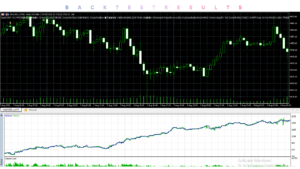
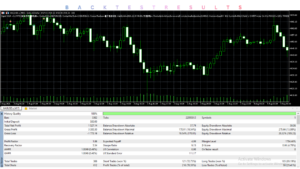
Squid X EA Backtesting & Performance
Backtesting is an important part of evaluating any automated trading system.
For Squid X EA, traders should request:
- Historical XAUUSD H1 testing.
- Testing across different market conditions.
- Maximum equity drawdown.
- Total trades and average trade duration.
- Profit factor and net profit.
- Modelling quality and spread assumptions.
- Results after commissions and other trading costs.
It is important to distinguish three types of results:
Backtest: Historical simulation using past market data.
Forward Test: Testing the EA on a demo or test account using current market prices.
Live Trading: Actual execution using real capital and real broker conditions.
A public, independently verified live signal and sufficiently detailed performance report were not established in the available product information. Therefore, no specific win rate, profit or drawdown figure should be assumed.
Historical performance is not a guarantee of future results.
How To Get Started With Squid X EA
Follow a careful installation and testing process:
- Check Compatibility: Confirm that you have MetaTrader 5 and a broker supporting XAUUSD.
- Review Settings: Understand lot sizing, recovery, stop loss and trading restrictions.
- Install the EA: Place the supplied
.ex5file in the MT5MQL5/Expertsdirectory and restart the terminal. - Attach to Chart: Open an XAUUSD H1 chart and attach the EA.
- Enable Trading: Configure the EA and enable Algo Trading where required.
- Demo Test: Run it on a demo account to evaluate execution and behaviour.
- Monitor: Review trades, floating drawdown, exposure and broker conditions.
- Consider Live Use: Only consider real-money deployment after understanding the strategy and testing its risk behaviour.
A reliable VPS is worth considering if you need the EA to operate without depending on your personal computer.
Conclusion
Squid X EA offers an interesting combination of technical analysis components for traders interested in automated Gold trading.
Its main attractions include XAUUSD specialisation, H1 chart configuration, Fibonacci retracement, trendline analysis, EMA confirmation and configurable position-sizing options.
However, the smart recovery functionality deserves particular attention. Traders should understand its exposure implications rather than assume it automatically protects an account.
The lack of independently established live performance evidence is another reason to request additional documentation and perform your own testing.
Support & Disclaimer
Support:
If you need help installing or configuring your EA, or face any kind of bug, feel free to reach out on:
Telegram Group: Join our community
Disclaimer:
Forex and gold trading involve risk. Past performance doesn’t guarantee future results. Always test robots on demo before live trading and use proper risk management.
REFERRAL
Join the VIP Signals Telegram Channel for real-time expert trading signals and stay ahead in the forex market. Get personalized strategies by becoming a part of our Real Account Management Telegram Channel and optimize your trading experience. If you’re aiming to Pass PropFirm Challenges , join our dedicated channel for tips and proven methods. Start managing your capital effectively with expert advice from our Funded Account Management Telegram Channel. For advanced traders, our HFT EA / Passing Telegram Channel offers high-frequency trading insights and strategies to boost your performance.