Pro Multi Sniper m EA V25.19 MT4: Advanced AI-Powered Scalping Expert Advisor
Introduction
In the fast-paced forex market, timing, precision, and risk control are everything. Many traders struggle with emotional decisions, late entries, or poor risk management that eat into profits. That’s where Pro Multi Sniper m EA V25.19 MT4 comes in — a cutting-edge automated trading system designed to deliver highly accurate sniper entries using machine learning and advanced scalping strategies.
This expert advisor is built for traders who want to maximize efficiency, protect capital, and automate their trading with professional-grade AI technology. It eliminates the stress of manual trading by applying intelligent entry filters, dynamic risk management, and a compound interest growth model.
Key Features of Pro Multi Sniper m EA V25.19 MT4
The EA stands out because of its combination of AI-based logic, scalping precision, and safety mechanisms. Here’s what makes it unique:
1. Machine Learning-Powered Decisions
Instead of relying solely on standard indicators, the EA integrates machine learning algorithms that adapt to market conditions. This ensures that entry points are not static but evolve with market volatility and liquidity.
2. Scalping with Compound Interest Method
The robot specializes in sniping trades during low-volatility sessions, particularly between the end of the US trading session and the middle of the Asia session. By applying scalping techniques with compound interest, it gradually grows account equity while minimizing risk exposure.
3. Dynamic Stop Loss (SL) System
Every trade has its own SL automatically set based on current market volatility. This prevents overexposure and protects the account from sudden spikes or unexpected movements.
4. Advanced Risk Management
The EA comes with auto-lot calculation enabled by default, scaling position sizes in proportion to account balance. For conservative traders, it also provides fixed lot options.
5. Adjustable Trade Entry Sensitivity
One of the standout features is the trade entry sensitivity parameter, which allows users to fine-tune how aggressively the EA looks for entry opportunities.
6. Precise Operating Time Filter
With a 1-minute accuracy time filter, the system only trades when market conditions are ideal. If no trades are opened, it means the system didn’t detect any safe entry signals.
7. BreakEven Function
To further secure profits, the EA automatically shifts stop-loss levels to breakeven once trades move into favorable profit territory.
8. Safe Logic – No Martingale or Grid
The EA completely avoids dangerous strategies like martingale or grid. Every trade is independent, with its own SL, making it one of the safest professional scalping EAs available.
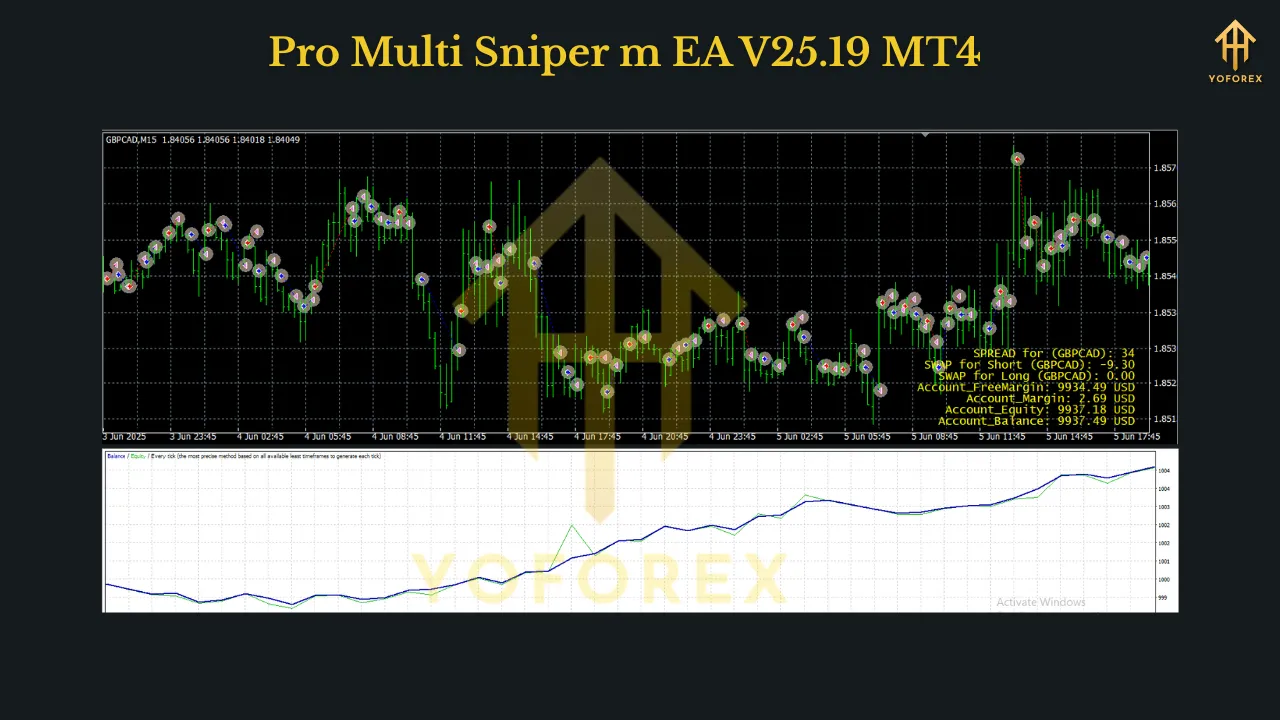
9. Built-In Info Display
The system provides a visual dashboard showing:
- Current spread and swaps of the pair
- Account balance, equity, and margins
- Adjustable display location (any chart corner)
Recommended Settings and Conditions
For maximum performance, the developer recommends the following setup:
- Timeframe: M15
- Pairs: GBPCAD, GBPAUD (with downloadable Set files available in the “Comments” section of the EA page)
- Minimum Deposit: Flexible; higher capital allows for better compounding
- Broker Type: ECN or Raw Spread accounts with low latency and fast execution
- Leverage: Any between 1:30 and 1:2000
- Trading Hours: End of US session until mid-Asia session
- VPS Hosting: Strongly recommended for uninterrupted 24/7 operation
Advantages of Using Pro Multi Sniper m EA
AI-driven strategy for smarter entries
Dynamic SL & BreakEven functions for account safety
No martingale or grid — safer long-term performance
Auto and fixed lot options for flexible risk control
Precise time filter ensures high-quality trades only
Built-in info panel to monitor spreads, swaps, and account status
Compound interest growth model to steadily grow equity
Scalping efficiency during quiet market sessions
How to Install Pro Multi Sniper m EA V25.19 MT4
Installing this expert advisor is simple and beginner-friendly:
- Open your MT4 trading account with an ECN/Raw Spread broker.
- Open the charts for GBPCAD and GBPAUD.
- Set the timeframe to M15 for both charts.
- Attach the EA to each chart.
- Apply the corresponding Set file (available in the EA’s “Comments” section).
- Ensure the parameter
Trading_Flag = true. - Leave the PC running or use a VPS for 24/7 automated trading.
Once installed, the robot operates independently. If it doesn’t open a trade during its operating window, it simply means that no safe sniper entry signal was detected — a sign of its disciplined strategy.
Who Is This EA For?
The Pro Multi Sniper m EA V25.19 MT4 is best suited for:
- Traders who prefer short-term scalping strategies with low drawdowns.
- Beginners looking for a hands-free trading solution that avoids risky methods.
- Professional traders who want to add diversification to their portfolio with an AI-based system.
- Investors who appreciate compound growth and consistent small gains over time.
Conclusion
The Pro Multi Sniper m EA V25.19 MT4 represents one of the most disciplined and technologically advanced forex robots available today. By combining machine learning intelligence, scalping precision, and strict risk management, it provides traders with a reliable and safe way to grow their capital.
Its focus on sniping trades during quiet market sessions, combined with features like dynamic SL, BreakEven, auto-lot risk management, and info display, makes it a professional-grade EA that can be trusted for long-term use.
If you are searching for a forex trading robot that offers AI-powered intelligence, safe scalping, and steady compound growth, the Pro Multi Sniper m EA V25.19 MT4 is a strong choice to add to your trading arsenal.
Join our Telegram for the latest updates and support