
Market Profile DWM Indicator V1.31 MQ4: An Essential Tool for Advanced Traders
The Market Profile DWM Indicator V1.31 MQ4 is a powerful tool designed to enhance the trading experience for Forex traders. With its unique approach to analyzing market behavior, it offers a different perspective from conventional price action analysis. The Market Profile DWM Indicator is particularly useful for traders who aim to develop a deeper understanding of market structure and price dynamics.
What is the Market Profile DWM Indicator V1.31 MQ4?
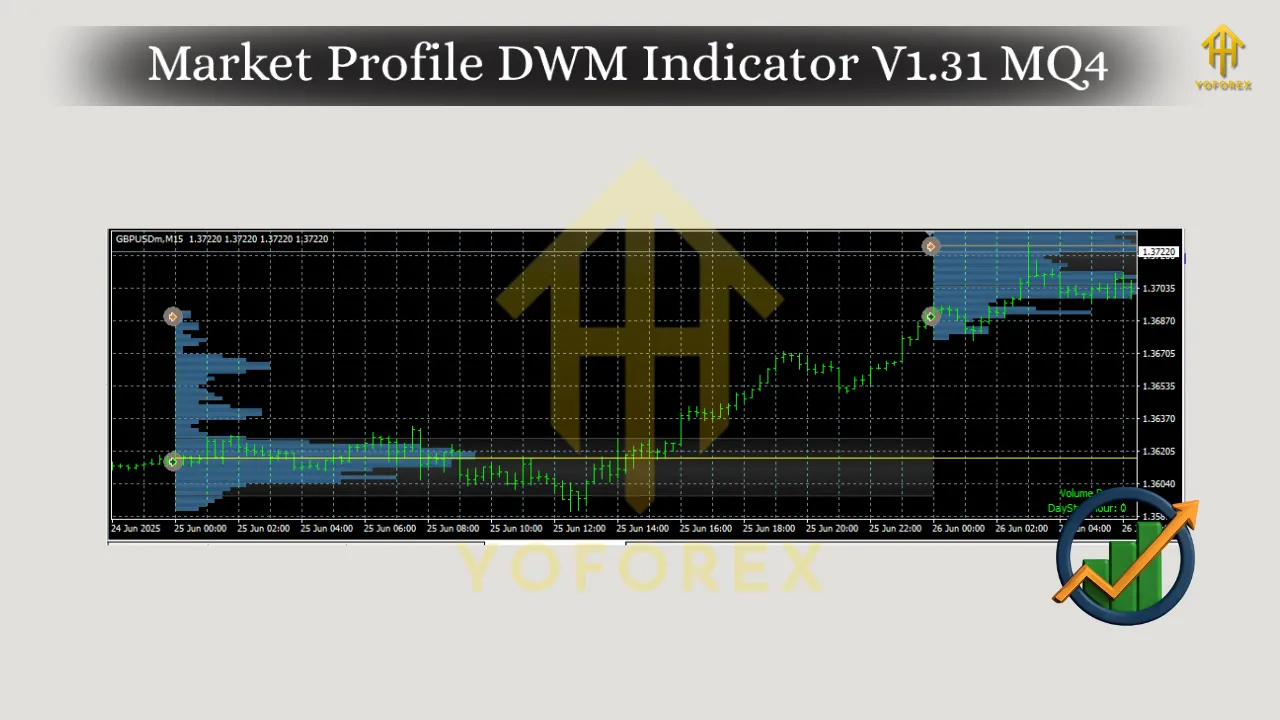
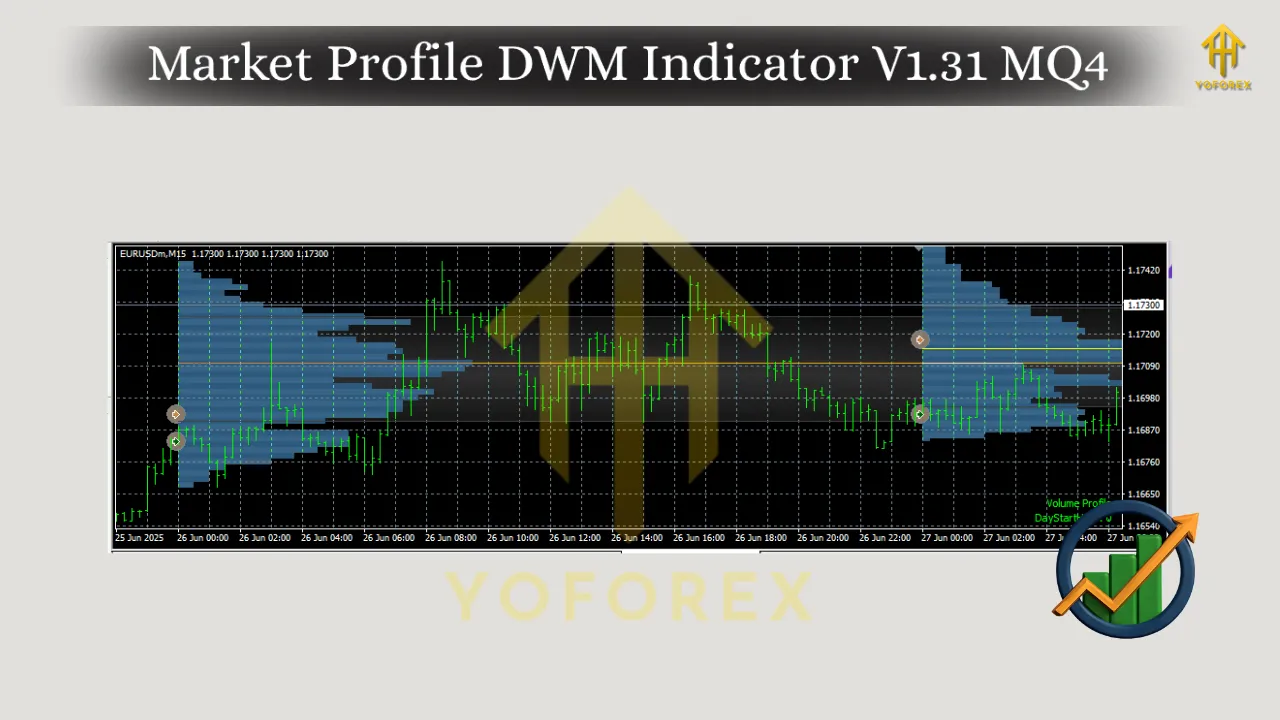
The Market Profile DWM Indicator is a highly effective analytical tool for MetaTrader 4 (MT4) traders. It visually represents the distribution of price over a certain time frame, allowing traders to better understand where price consolidation, support, resistance, and trend shifts are likely to occur. This indicator works by categorizing price action into distinct profiles, such as Value Area, Point of Control (POC), and other key levels.
Developed for the MetaTrader 4 (MT4) platform, the Market Profile DWM Indicator V1.31 provides traders with a valuable tool for market analysis. By mapping price movements onto a structured profile, it gives clear insights into market behavior, enabling traders to make informed decisions based on historical and current price patterns.
Key Features of the Market Profile DWM Indicator V1.31 MQ4
-
Value Area Calculation:
The indicator automatically calculates the Value Area (VA), which shows the price range where 70% of the total volume of a specific trading session is traded. By identifying this critical area, traders can recognize price levels where most of the market activity has occurred. Understanding the Value Area helps traders spot potential support or resistance zones. -
Point of Control (POC):
The Point of Control is the price level at which the highest volume of trades has occurred. It represents the fair value of the market during a specific period. For any trader looking to gauge the strength of a trend or predict future price movements, the POC is an essential level to watch. -
Timeframe Flexibility:
The Market Profile DWM Indicator V1.31 allows traders to customize the timeframes on which they wish to conduct their analysis. Whether you’re a day trader focusing on short-term movements or a swing trader looking at longer time frames, the indicator can be adjusted to fit any trading strategy. -
Dynamic Visualization:
The indicator provides a visual representation of the market profile, making it easier for traders to spot key levels like the Value Area High, Value Area Low, and the POC. This dynamic chart visualization improves a trader’s ability to interpret market data quickly. -
Customizable Settings:
Market Profile DWM Indicator V1.31 MQ4 is highly customizable, allowing traders to modify the settings according to their individual preferences. Whether adjusting the colors for visibility or tweaking the period for the profile, this indicator offers flexibility for traders to tailor it to their needs.
How to Use the Market Profile DWM Indicator V1.31 MQ4
The Market Profile DWM Indicator is ideal for both beginner and advanced traders, and it can be used in multiple trading strategies. Here’s a quick overview of how traders can incorporate it into their trading plan:
Step 1: Set Up the Indicator on MT4
After downloading and installing the indicator, add it to your MT4 platform. Simply drag and drop it onto the chart of your preferred trading pair, and adjust the settings to your liking. The Market Profile DWM Indicator will then display the market profile for the selected timeframe.
Step 2: Analyze Market Structure
Once the indicator is applied, traders can start identifying key levels such as the Value Area, POC, and other relevant zones. These levels give an indication of where the market is likely to react. Traders can also observe the width of the Value Area to understand the range of market acceptance.
Step 3: Plan Your Trades
Market Profile analysis can help traders make informed decisions on when to enter or exit trades. For instance, if the price breaks through the Value Area High or Low, it could indicate a potential trend reversal or continuation. The Point of Control often acts as a support or resistance level, so a break of the POC may signal a strong trend.
Step 4: Combine with Other Indicators
While the Market Profile DWM Indicator is highly effective on its own, it can be even more powerful when combined with other technical analysis tools. Many traders pair it with indicators like moving averages, RSI, or stochastic oscillators to refine their entries and exits.
Benefits of Using the Market Profile DWM Indicator
-
Improved Market Understanding:
The main advantage of using the Market Profile DWM Indicator V1.31 MQ4 is that it provides a deeper insight into the structure of the market. By identifying where price distribution has occurred, traders can assess which price levels are more likely to attract buying or selling interest. -
Better Risk Management:
With its precise identification of support and resistance zones, traders can manage risk more effectively. Knowing where the Value Area and POC lie allows traders to set more accurate stop-loss and take-profit orders, minimizing the risk of large losses. -
Accurate Entry and Exit Signals:
The Market Profile DWM Indicator can help traders identify ideal points for entering and exiting trades. For example, if the price is testing a Value Area Low, and the market profile suggests that the price is likely to reverse, it could be an opportune moment to buy. -
Versatility for Multiple Timeframes:
Unlike other indicators that may only work effectively on certain timeframes, the Market Profile DWM Indicator can be adjusted to suit any timeframe. Whether you’re trading on a 1-minute chart or a daily chart, the indicator will provide valuable insights.
Limitations and Considerations
-
Complexity for Beginners:
While the Market Profile DWM Indicator is a great tool, it may take some time for beginner traders to fully understand how to use it effectively. It’s important to practice using the indicator in a demo account to get accustomed to its features before applying it to live trading. -
Not a Standalone Tool:
Although the Market Profile DWM Indicator provides valuable insights, it should not be used in isolation. Combining it with other tools like candlestick patterns, trend lines, and technical indicators will yield better results.
Download Link
To get started with the Market Profile DWM Indicator V1.31 MQ4, you can download it from the following link:
Download Market Profile DWM Indicator V1.31 MQ4
Conclusion
The Market Profile DWM Indicator V1.31 MQ4 is an essential tool for Forex traders looking to take their market analysis to the next level. By providing clear visualizations of market activity, the indicator helps traders identify key price levels, manage risks, and plan trades with greater precision.
Whether you’re a seasoned professional or just starting out in the world of Forex, the Market Profile DWM Indicator V1.31 can be a game-changer. With its customizable settings, dynamic visualization, and versatile timeframe options, it’s a must-have tool for serious traders.