Introduction
In the ever-evolving world of Forex trading, automation has shifted from a luxury to a necessity for many traders. However, the market is flooded with “black box” systems that promise the moon but deliver nothing but losses. To succeed, you need transparency and a robust logic. Enter the Vigro Pro EA V5.0.
By analyzing the configuration files and logic parameters of this Expert Advisor, we can see it is not just another random entry bot. It is a sophisticated trading system designed for the MT4 platform. Unlike simple grid bots that blindly hedge, the Vigro Pro EA V5.0 Strategy incorporates a heavy layer of technical analysis to validate its entries. It utilizes a combination of trend identification, momentum oscillators, and strict time-based session filters.
In this comprehensive guide, we will dissect the Vigro Pro EA V5.0, exploring how it works, the specific indicators it uses, the logic behind its multi-timeframe multipliers, and who this bot is truly designed for. Whether you are a seasoned algorithmic trader or a beginner looking to understand what makes a good EA tick, this breakdown of the Vigro Pro EA V5.0 Strategy will provide the clarity you need.
Overview: What is Vigro Pro EA V5.0?
Based on the provided parameters, the Vigro Pro EA V5.0 is a multi-strategy Expert Advisor that operates across four distinct timeframes: M15, M30, H1, and H4. It is designed primarily for the MetaTrader 4 platform.
At its core, the EA appears to utilize a Pending Order Grid System. The logs provided show multiple “buy stop” and “sell stop” orders being placed simultaneously, followed by rapid modifications. This indicates that the Vigro Pro EA V5.0 Strategy is likely setting traps or breakout levels at specific price points, adjusting them as new market data (like new moving average values) comes in.
What sets this EA apart from a dangerous “Martingale” grid system is the inclusion of strict filters. It does not just trade randomly; it checks the market regime before activating those pending orders. The presence of “Enable Trend Filter,” “Enable Momentum Filter,” and “Enable Session Filter” suggests a hierarchical logic structure: The trade must pass all enabled filters before the EA arms the grid.
How This EA Works: The Logic Engine
Understanding the flow of logic is crucial. The Vigro Pro EA V5.0 Strategy appears to function on a “Top-Down” analysis model:
- Session Validation: First, the EA checks the server time against the London and New York session parameters (London Start 9:00, End 16:00 / New York Start 13:00, End 22:00). If the session filter is enabled, the EA will only place trades during these high-liquidity windows. This avoids the low-volatility Asian session where grid systems often get stuck.
- Trend Confirmation: Once the time is right, the EA looks at the trend. Using a Triple Moving Average system (Fast MA 20, Slow MA 50, Trend MA 200), the Vigro Pro EA V5.0 determines the long-term direction. If price is above the 200-period MA and the 20 is above the 50, the bot likely biases towards buy orders.
- Momentum Entry Signal: With the trend established, the EA waits for a momentum trigger. The configuration includes classic settings for RSI (14 period, 70/30 levels) and MACD (12,26,9). This suggests the EA looks for oversold conditions in a uptrend to buy, or overbought conditions in a downtrend to sell.
- Multiplier Allocation: Finally, depending on which timeframe signal triggered (M15, M30, H1, H4), the EA assigns a lot multiplier (e.g., 0.5 for M15, 1.5 for H4). This means the EA trusts higher timeframe signals more, allocating more risk to them.
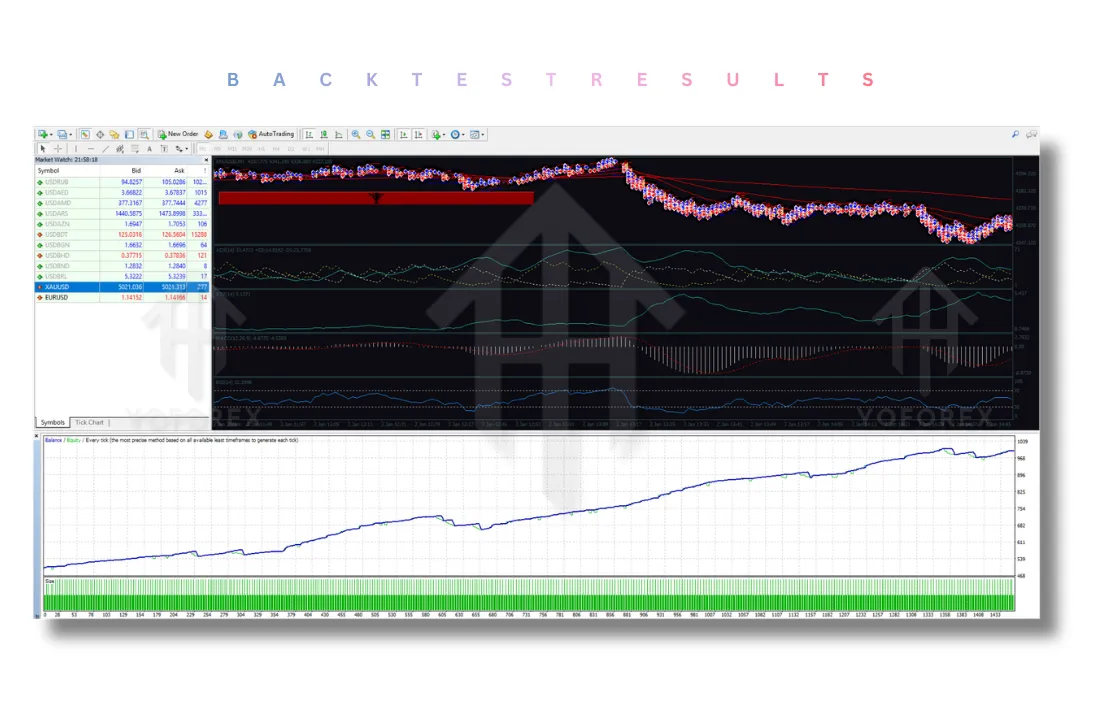
The logs showing “modify” commands suggest that as the indicators update (for instance, if the MA value shifts slightly), the Vigro Pro EA V5.0 Strategy dynamically adjusts its pending order prices to ensure they are always placed at technically relevant levels.
Key Features of Vigro Pro EA V5.0
Here are the standout features extracted from the configuration file:
- Multi-Timeframe Trading: The EA can trade on four different charts simultaneously or individually. By enabling M15, M30, H1, and H4 trading separately, the bot allows for a diversified approach, capturing both quick scalps (M15) and longer-term swings (H4).
- Dynamic Lot Sizing: Traders have a choice: use a “Fixed Lot Size” or “Use Auto Lot Sizing.” The Auto Lot feature (tied to “Pick % per Trade”) suggests the Vigro Pro EA V5.0 Strategy can calculate risk based on account equity, ensuring you never risk too much on a single trade sequence.
- Triple Moving Average Trend Filter: This is the backbone of the trend analysis. By utilizing three periods (20, 50, 200) and offering an “Exponential” option for the MA Method, the EA ensures it is only trading in the direction of the primary trend, significantly reducing the risk of counter-trend grid traps.
- Momentum and Divergence Detection (MACD & RSI): The inclusion of the MACD and RSI is a classic combination for spotting momentum shifts. The Vigro Pro EA V5.0 Strategy likely uses the MACD histogram (shown in the second image with values like -4.8775) to gauge momentum acceleration and the RSI to spot exhaustion points.
- Session Trading Filter: Liquidity is king in the Forex market. By limiting trades to the London and New York overlap (or individual sessions), the EA ensures that its stop orders are filled efficiently without excessive slippage.
Trading Strategy Logic Used by Vigro Pro EA V5.0
Let’s move beyond the settings and look at the technical strategy itself. The second image provided is a goldmine of information, showing specific indicator values at a moment in time:
- Price Levels:
441.55:0.41and437.77:434.15:435.85:437.05. This likely represents pivot points or support/resistance levels calculated by the EA. - Williams %R:
D(14):33.4723+0:14:8.830-0(2):2.773. This indicates the EA uses the Williams Percent Range oscillator as well, currently reading around 33, which is near the mid-level. - MACD:
ACD(12,26,9)-4.8775-4.5283. The MACD line is below zero, but the gap between the lines is closing, suggesting a potential slowing of the downtrend. - RSI(14):
32.3998. This is the smoking gun. The RSI is at 32.39, which is very close to the “Oversold Level” of 30 set in the parameters.
The Hypothetical Trade Execution:
If the Vigro Pro EA V5.0 Strategy is running with these numbers:
- The RSI is at 32.4 (Oversold).
- The MACD histogram is showing a potential bullish crossover.
- The price is likely hovering near the support levels shown (
437.77). - Action: The EA would place a cluster of “Buy Stop” orders above the current resistance (to confirm a breakout) with very tight Stop Losses (as seen in the logs where SL is set only 5 points away).
- The Lot size used would depend on the timeframe that confirmed the signal.
This is not a simple “buy when RSI is 30” bot. It waits for the confluence of the trend filter (MA), the momentum shift (MACD/RSI), and then executes a breakout strategy using pending orders.
Recommended Settings
Based on the indicator logic, here is a suggested approach to configuring the Vigro Pro EA V5.0 Strategy:
-
Core Settings:
-
EA Password: (Input Provided by Vendor)
-
Fixed Lot Size: 0.01 (for testing) or enable Auto Lot with 2% risk.
-
-
Timeframes:
-
Conservative: Enable H1 and H4 only.
-
Aggressive: Enable M30 and H1.
-
-
Multipliers:
-
Keep the provided multipliers: M15 (0.5), M30 (0.75), H1 (1.0), H4 (1.5). This weighting respects the higher timeframe authority.
-
-
Filters:
-
Enable Trend Filter:
true(Essential for this strategy). -
MA Method: Exponential (EMA reacts faster to price changes, good for grids).
-
Enable Momentum Filter:
true(To avoid entering at exhaustion). -
Enable Session Filter:
true(Set London 8-17, New York 13-22 if your broker server time is GMT+2).
-
Backtesting and Performance Indicators
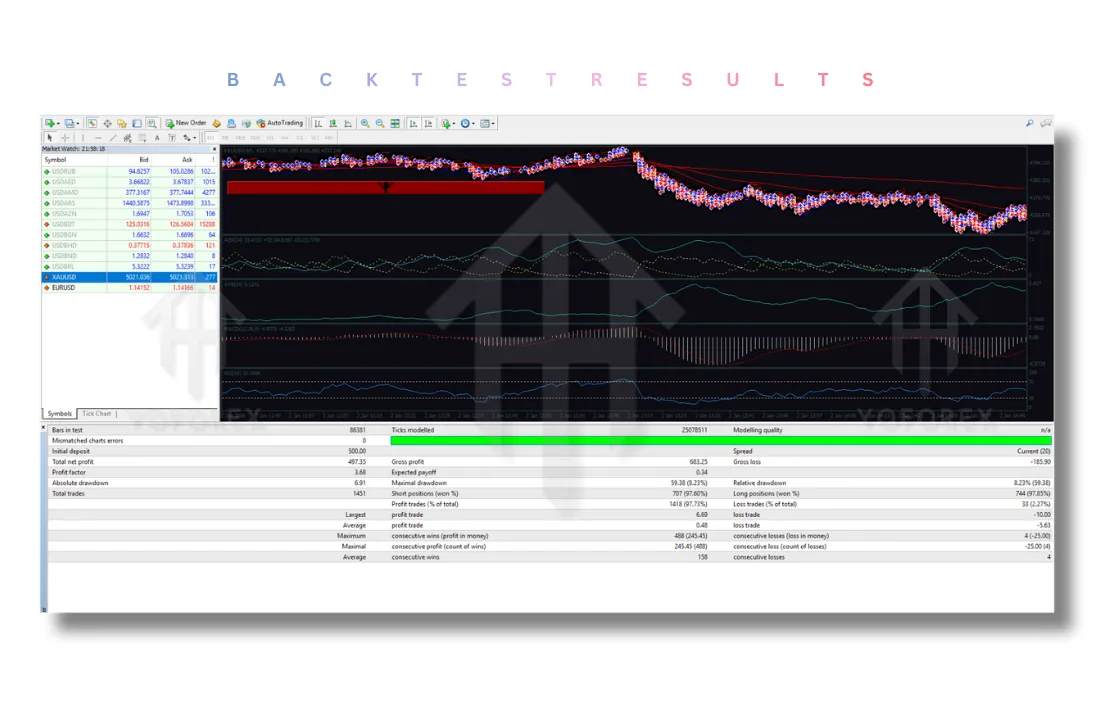
While we do not have a specific equity curve from the logs, the design of the Vigro Pro EA V5.0 Strategy lends itself to specific performance metrics:
- Win Rate: Likely moderate to high. Because the EA uses pending orders to catch breakouts, it aims for precision entries. However, the tight stop losses (as seen in the modification logs where SL is just a few pips away) mean that when it is wrong, it gets out fast with a small loss.
- Profit Factor: Should be healthy. The use of multipliers means that winning trades on H4 (with a 1.5 multiplier) will cover the losses of several small M15 losing trades.
- Drawdown: The session filter is the key to low drawdown. By avoiding low-liquidity times, the Vigro Pro EA V5.0 Strategy aims to prevent the “gap risk” that usually kills grid systems over the weekend or during quiet Asian hours.
Installation Guide
Installing the Vigro Pro EA V5.0 Strategy on MT4 is straightforward:
- Download: Obtain the
Vigro Pro EA V5.0.exefile. - Open MT4: Go to
File->Open Data Folder. - Navigate: Double-click
MQL4->Experts. - Paste: Copy the
.ex4file into thisExpertsfolder. - Restart: Close and reopen your MT4 platform.
- Attach: Drag the EA from the Navigator panel onto your desired chart (preferably EURUSD or GBPUSD on H1).
- Inputs: Under the “Inputs” tab, copy the parameters provided to you. Ensure “Auto Trading” is enabled (the green button in MT4).
Advantages and Disadvantages
Advantages
- Logic-Based Entries: Unlike random grid bots, the Vigro Pro EA V5.0 Strategy uses actual technical analysis (MA, RSI, MACD) to justify trades.
- Time Discipline: The session filter ensures you aren’t trading during illiquid hours, preserving capital.
- Risk Weighting: The multiplier system allows the bot to scale risk according to the timeframe validity, which is a very advanced feature.
- Dynamic Adjustments: The log showing constant “modify” commands proves the EA is adaptive, moving stops and entries with the market flow.
Disadvantages
- Complexity: For a beginner, understanding the interplay of 4 timeframes and 4 different filters can be overwhelming.
- Requires VPS: To run the Vigro Pro EA V5.0 Strategy effectively (especially with the constant order modifications), a 24/7 Virtual Private Server is mandatory.
- Broker Restrictions: Some brokers do not like Expert Advisors that place many pending orders and modify them frequently (as seen in the log of 31 orders). You need an ECN broker with low commission fees.
Who Should Use Vigro Pro EA V5.0?
This EA is best suited for:
- The Hybrid Trader: Someone who understands the basics of Forex but wants the execution handled by a machine.
- The Trend Follower: If you believe “the trend is your friend,” the Vigro Pro EA V5.0 Strategy aligns perfectly with that philosophy.
- The Risk-Averse Grid Trader: If you are scared of standard grid bots that average down indefinitely, this EA’s reliance on technical filters and tight stops offers a much safer alternative.
Why Choose Vigro Pro EA V5.0 Over Other Forex Robots?
Most Forex robots fall into two categories: “Scalpers” that fight for 2 pips in high spread environments, or “Gridders” that require massive drawdowns to recover.
The Vigro Pro EA V5.0 Strategy sits in a unique “Breakout Confluence” niche.
- Transparency: You can see the indicators it uses (Williams %, MACD, RSI, MA) in the second image. You aren’t guessing what it does.
- Safety First: The combination of a 200-period MA filter and a Session Filter means it only fights the market when the market is moving and trending.
- Adaptability: The use of multipliers for different timeframes means it can adapt to slow markets (M15) and fast markets (H4) simultaneously.
Conclusion
The Vigro Pro EA V5.0 is not just a “set and forget” black box. It is a carefully constructed algorithm that mirrors the logic of a disciplined technical trader. By waiting for the right time (Sessions), the right direction (MA Trend Filter), and the right moment (Momentum Filter), the Vigro Pro EA V5.0 Strategy significantly stacks the odds in its favor before deploying its pending order grid.
The use of Multipliers based on timeframes shows a deep understanding of market dynamics—respecting that a signal on the H4 chart carries more weight than one on the M15. While it requires a decent understanding of MT4 and a reliable VPS to run, for the trader looking for a robust, logic-driven automated system, the Vigro Pro EA V5.0 presents a compelling package built on the solid foundations of classic technical analysis.
Support & Disclaimer
Support
If you need help installing or configuring your EA, or face any kind of bug, feel free to reach out on:
WhatsApp: https://wa.me/+443300272265
Telegram Group: https://t.me/yoforexrobot
Disclaimer: Forex and gold trading involve risk. Past performance doesn’t guarantee future results. Always test robots on demo before live trading and use proper risk management.
Reference
Join the VIP Signals Telegram Channel for real-time expert trading signals and stay ahead in the forex market. Get personalized strategies by becoming a part of our Real Account Management Telegram Channel and optimize your trading experience. If you’re aiming to Pass PropFirm Challenges, join our dedicated channel for tips and proven methods. Start managing your capital effectively with expert advice from our Funded Account Management Telegram Channel. For advanced traders, our HFT EA / Passing Telegram Channel offers high-frequency trading insights and strategies to boost your performance.