In the fast-paced world of forex trading, automation has become a crucial tool for enhancing efficiency, accuracy, and profitability. FXbot EA V4.50 MT4 is an Expert Advisor designed to simplify the process of forex trading by using algorithms and custom indicators. Developed for MetaTrader 4 (MT4), FXbot EA aims to eliminate human error, optimize trading strategies, and provide a hands-off trading experience.
For traders seeking to improve their performance without dedicating all their time to monitoring charts, FXbot EA offers a solution that could potentially improve trading results. In this blog post, we’ll explore the features, installation, and performance of FXbot EA V4.50 MT4 to help you determine if this EA is the right choice for your forex trading journey.
What is FXbot EA V4.50 MT4?
FXbot EA V4.50 is an automated trading system specifically built for the MetaTrader 4 platform. It is designed to trade forex currency pairs without manual intervention, making it a perfect tool for traders who want to automate their trading strategies. Using a combination of custom-built indicators and market analysis, FXbot EA automatically places trades based on predetermined conditions. These trades are executed instantly, with no human involvement required.
The EA works by analyzing market conditions like volatility, price direction, and momentum. Once these factors meet the criteria set by the EA’s algorithm, it places a trade at the optimal time. It also manages the trade, adjusting stop-loss and take-profit levels based on market conditions, making trading more efficient and less stressful.
Key Features of FXbot EA V4.50 MT4
-
Custom Oscillator-Based Strategy
FXbot EA V4.50 utilizes a custom-built oscillator to identify changes in price trends, momentum, and market volatility. Unlike standard indicators such as MACD or RSI, this custom oscillator is designed to give a more accurate reading of market sentiment, allowing the EA to adapt quickly to changing market conditions. It analyzes price behavior to provide clear signals for entry and exit points. -
Pending Order Execution
FXbot EA does not simply enter the market immediately. Instead, it places pending orders, which are executed once certain market conditions are met. This strategy can help traders avoid getting caught in unfavorable market conditions and improve the chances of entering trades at better prices. -
Volatility-Adaptive Trading
One of the standout features of FXbot EA is its ability to adapt to different levels of market volatility. During periods of low volatility, the EA reduces its trading activity to minimize risk. On the other hand, when the market shows signs of increased volatility, FXbot EA becomes more active and places trades to capitalize on the market movement. -
Multiple Trading Modes
FXbot EA V4.50 offers multiple trading modes that allow traders to adjust the level of aggressiveness or conservativeness based on their risk tolerance and trading preferences. This flexibility is ideal for both beginner and advanced traders, as they can tailor the EA to suit their specific strategy. -
Backtesting Capability
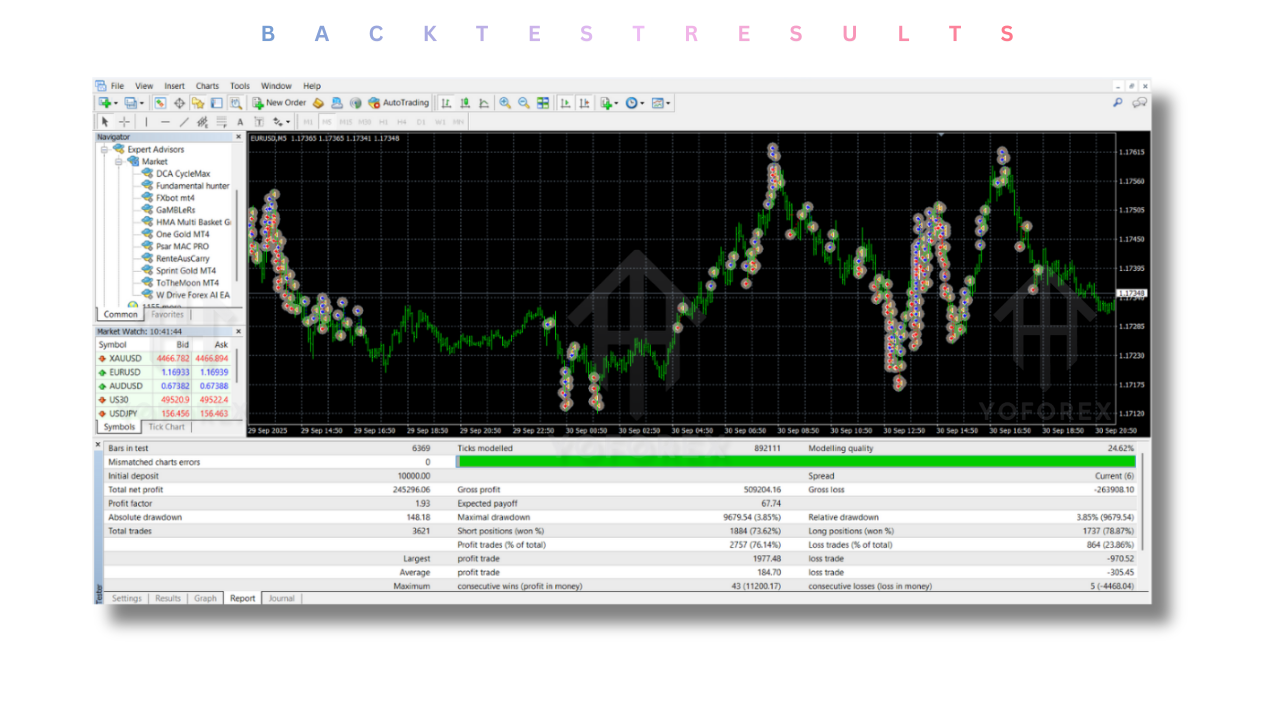
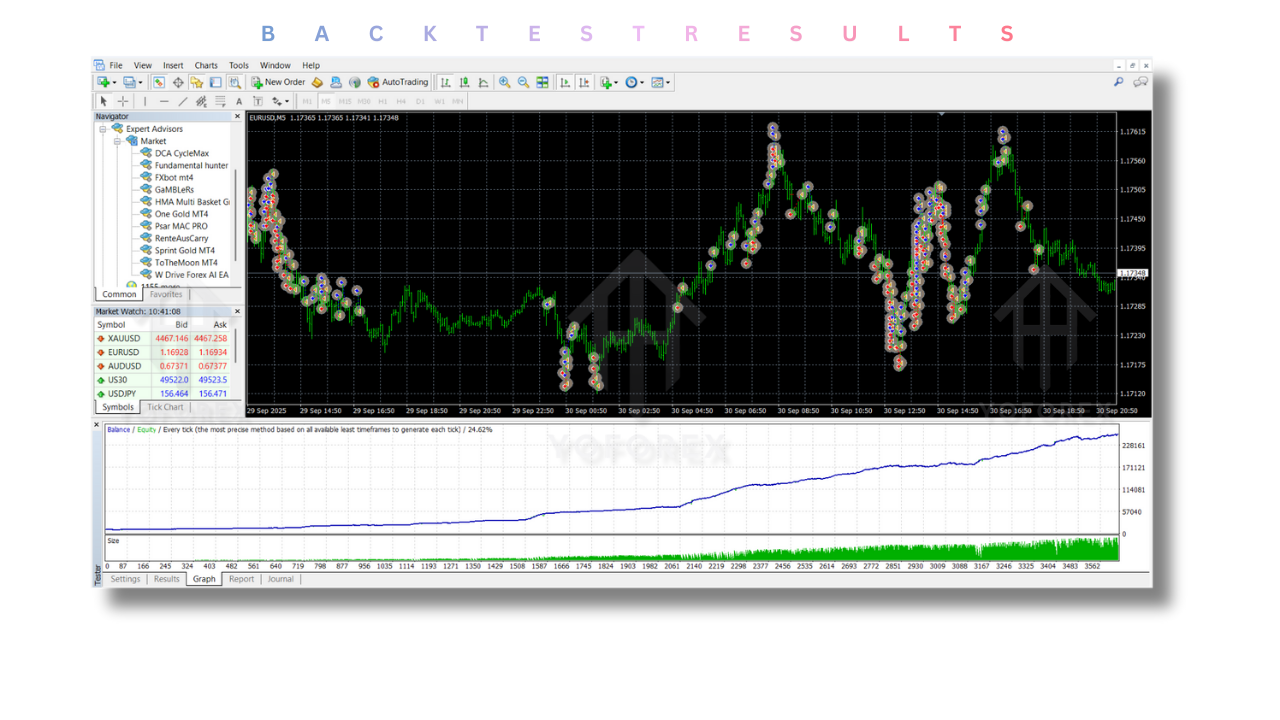
Before using FXbot EA in live trading, traders can backtest the EA’s performance using historical market data. This helps to ensure that the EA performs well under different market conditions. Backtesting also allows traders to fine-tune the EA’s settings for optimal performance.
How Does FXbot EA V4.50 MT4 Work?
FXbot EA operates by analyzing market data to detect optimal trading opportunities. It uses its custom oscillator to identify trends, volatility, and momentum in the forex market. Based on the signals generated by the oscillator, the EA places pending orders to enter the market when the conditions are right.
Once an order is triggered, FXbot EA manages the trade by adjusting the stop-loss and take-profit levels. It also moves the stop-loss to break-even once the trade moves in profit, ensuring that no losses occur if the market turns against the trade.
Traders can adjust the EA’s settings to suit their strategy, including risk parameters, trading times, and stop-loss limits. The EA can run 24/7, ensuring that no opportunities are missed while traders can focus on other tasks.
Who Should Use FXbot EA V4.50 MT4?
FXbot EA V4.50 is designed to cater to traders of all experience levels. Whether you’re just starting your trading journey or are an experienced forex trader, FXbot EA can help automate your strategies and improve efficiency.
-
Beginner Traders
For beginners, FXbot EA provides an opportunity to automate trades without the need to constantly monitor the market. It’s perfect for those who are still learning how to trade but want to take advantage of market opportunities in real time. -
Intermediate Traders
Intermediate traders can use FXbot EA to implement their strategies automatically. The EA allows them to focus on refining their strategies while leaving the trade execution to the automated system. The ability to backtest and customize the EA’s settings is especially beneficial for traders looking to optimize their strategies. -
Professional Traders
For advanced traders, FXbot EA offers a way to reduce manual trading efforts while maintaining control over risk management. Professional traders can use the EA to execute trades while they focus on strategy refinement and market analysis.
Advantages of Using FXbot EA V4.50 MT4
-
Time-Saving Automation
With FXbot EA, traders can automate the entire trading process, from entry to exit. This saves significant time and effort, allowing traders to focus on other areas of their trading business or even other investments. -
Increased Efficiency
FXbot EA operates faster than human traders, executing trades based on real-time market analysis. This speed is critical in the forex market, where small price movements can lead to significant profits or losses. -
Customizable Settings
FXbot EA offers a high level of customization. Traders can adjust the EA’s settings based on their trading goals, risk tolerance, and preferred trading style. This flexibility allows for a tailored trading experience. -
Backtesting Support
FXbot EA allows traders to backtest its performance using historical data. This is essential for testing trading strategies in different market conditions and ensuring that the EA performs well before going live.
Disadvantages of FXbot EA V4.50 MT4
-
Requires Proper Configuration
While FXbot EA is user-friendly, it does require proper configuration for optimal performance. Traders must understand how the EA’s settings affect its behavior and adjust them accordingly. -
No Public Verified Performance
One limitation of FXbot EA is the lack of publicly verified live trading results. While the EA can be backtested, traders should use caution and test the EA on a demo account before using it with real money. -
Broker Compatibility
FXbot EA works best with brokers that offer low spreads and fast execution speeds. Traders using brokers with high slippage or restrictive conditions may not see the same level of success.
FXbot EA V4.50 MT4 Installation Guide
Installing FXbot EA on MetaTrader 4 is a simple process, but it requires a few essential steps:
-
Download the EA File
First, download the FXbot EA file from the official website or MQL5 marketplace. -
Install on MetaTrader 4
Open MT4 and go to File > Open Data Folder > MQL4 > Experts. Paste the FXbot EA file into the Experts folder. -
Enable Auto Trading
Ensure that Auto Trading is enabled in MT4. -
Attach to Chart
Open a forex chart in MT4, drag FXbot EA from the Navigator window, and drop it onto the chart. Adjust the EA’s parameters according to your trading preferences. -
Start Trading
Once the EA is attached to the chart, it will begin executing trades automatically based on the configured settings.
Conclusion: Should You Use FXbot EA V4.50 MT4?
FXbot EA V4.50 is an excellent tool for traders looking to automate their forex trading strategies. Its ability to adapt to market conditions, combined with its custom oscillator and pending order execution system, makes it a powerful tool for both beginners and experienced traders.
However, it is essential to backtest and demo test the EA before using it in a live account. While the EA offers numerous benefits, including automation, flexibility, and time-saving features, traders must ensure it aligns with their trading strategy and risk tolerance.
If you’re looking for an automated forex trading solution that provides efficiency and flexibility, FXbot EA V4.50 MT4 is worth considering. Always remember to use proper risk management and monitor your trades to ensure consistent performance.
Support & Disclaimer
Support
If you need help installing or configuring your EA, or face any kind of bug, feel free to reach out on:
WhatsApp: Click here
Telegram Group: Join our community
Disclaimer: Forex and gold trading involve risk. Past performance doesn’t guarantee future results. Always test robots on demo before live trading and use proper risk management.
Refferal
Join the VIP Signals Telegram Channel for real-time expert trading signals and stay ahead in the forex market. Get personalized strategies by becoming a part of our Real Account Management Telegram Channel and optimize your trading experience. If you’re aiming to Pass PropFirm Challenges, join our dedicated channel for tips and proven methods. Start managing your capital effectively with expert advice from our Funded Account Management Telegram Channel. For advanced traders, our HFT EA / Passing Telegram Channel offers high-frequency trading insights and strategies to boost your performance.
Happy Trading