Introduction
The world of automated trading is flooded with Expert Advisors (EAs) promising the moon, but very few deliver stability without blowing up accounts through risky grid or martingale strategies. Today, we are conducting a deep technical dive into a sophisticated piece of code designed for the MetaTrader 4 platform: the Galaxy 5 EA V1.00.
Unlike simple “scalpers” that fight the spread or risky “hedgers” that double down on losing positions, the Galaxy 5 EA V1.00 aims to bring institutional-grade logic to retail traders. This EA claims to operate on advanced neural networks combined with classic support/resistance dynamics .
In this comprehensive guide, we will dissect every aspect of the Galaxy 5 EA V1.00. We will look under the hood at its trading engine, analyze the recommended pairs, discuss installation on MT4, and weigh the advantages against the disadvantages. Whether you are a novice looking for set-and-forget or a veteran seeking to diversify your portfolio, this review of the Galaxy 5 EA V1.00 is for you.
Overview of the Galaxy 5 EA V1.00
The Galaxy 5 EA V1.00 is a fully automated trading robot specifically compiled for the MetaTrader 4 platform. It is classified as a “multi-strategy” tool, meaning it does not rely on a single entry signal but rather a confluence of up to five different trading logics working in parallel .
One of the standout technical aspects of the Galaxy 5 EA V1.00 is its base architecture. It is built to handle multiple currency pairs from a single chart, a feature often referred to as “One Chart Setup” (OCS). By attaching the EA to a single NZDCAD H1 chart, it can manage positions on NZDCAD, EURCAD, USDCHF, AUDUSD, CADJPY, EURCHF, EURJPY, and GBPNZD .
This architecture is crucial for modern traders because it eliminates the need to run multiple instances of the Galaxy 5 EA V1.00 across 8 different windows, saving CPU resources and simplifying risk management.
How This EA Works
Understanding the mechanics of the Galaxy 5 EA V1.00 is essential for trust. Unlike “black box” EAs that hide their logic, this EA relies on transparency in its structure.
The core engine of the Galaxy 5 EA V1.00 utilizes a neural network. In practical trading terms, this means the EA “learns” from historical and current price patterns to adjust its entry logic dynamically. It analyzes trend strength, volume (tick velocity), and support/resistance zones .
Here is the step-by-step workflow of the Galaxy 5 EA V1.00:
-
Data Filtering: The EA waits for a new bar to open (on the H1 timeframe). It scans the defined basket of currency pairs.
-
Neural Network Analysis: It runs the current price data through its pre-trained neural network to determine the probability of a directional move.
-
Strategy Selection: Depending on market volatility (trending vs. ranging), the EA picks one of its five internal strategies .
-
Execution: The EA places a trade with a preset Stop Loss (SL) and Take Profit (TP). Crucially, it does not use martingale or grid recovery methods .
-
Exit: The trade is closed either by hitting the TP/SL or via a trailing stop mechanism that locks in profits as the trade moves favorably.
Key Features
The Galaxy 5 EA V1.00 comes packed with features designed for safety and efficiency. Here are the top specifications that define this robot :
- Multi-Currency Basket: Trades up to 8 major and cross pairs simultaneously from a single chart.
- No Martingale / No Grid: Perhaps the most important feature. The Galaxy 5 EA V1.00 strictly avoids the dangerous practice of increasing lot sizes on losing trades .
- Neural Network Integration: Uses AI to adapt to changing market conditions rather than relying on static indicators alone.
- Advanced Time Filters: Allows users to set specific trading start and end times, avoiding high volatility around news events.
- Prop Firm Ready: Includes specific settings for DrawDown control (Max DrawDown to close all), making the Galaxy 5 EA V1.00 suitable for FTMO and other proprietary trading firm challenges .
- Dynamic Risk Management: Features Auto Lot calculation based on a percentage of account balance.
Trading Strategy Logic Used by Galaxy 5 EA V1.00
To rank high on Google and provide real value, we must dissect the “secret sauce” of the Galaxy 5 EA V1.00.
Many traders ask: Is it a scalper? Is it a trend follower?
The Galaxy 5 EA V1.00 is a Hybrid Strategy Engine. It combines five distinct approaches to the market :
-
Support & Resistance Flip: The EA identifies key institutional levels. When price breaks a support level and retests it as new resistance (or vice versa), the Galaxy 5 EA V1.00 enters the breakout direction.
-
Volume Confirmation: The neural network processes tick volume. If price is rising but volume is declining, the Galaxy 5 EA V1.00 may avoid a long entry (predicting a false breakout).
-
Trend Continuation: In strong trending markets (identified via ADX-like logic inside the neural net), the EA ignores minor retracements and waits for pullbacks to enter the main trend.
-
Mean Reversion: In range-bound markets, the Galaxy 5 EA V1.00 acts as a counter-trend trader, buying near the bottom of the daily range and selling near the top, strictly guarded by Stop Losses.
-
Time-Based Exits: The EA can close positions that haven’t reached their target within a specified time frame, freeing up margin for new opportunities.
Recommended Settings
For optimal performance of the Galaxy 5 EA V1.00, you must configure it correctly. Based on the technical documentation, here are the recommended settings for MT4 :
Chart Setup:
- Timeframe: H1 (Hourly)
- Symbol: NZDCAD (This is the “Master” chart; the EA will trade the basket from here)
Input Parameters Configuration:
| Parameter Category | Setting Name | Recommended Value | Reasoning |
|---|---|---|---|
| Main | Magic Number | 71823 (or unique ID) | Identifies trades placed by the EA |
| Risk | Risk (Auto Lot) | 1.0 – 2.0 | For accounts < $10k, use 1.0; for Prop Firms, use 0.5-1.0 |
| Risk | Fixed Lot | 0.01 (if Risk = false) | For large accounts or testing |
| Risk | Max Lot | 1.0 | Caps the maximum lot size |
| Filters | Max Spread | 140.0 (points) | Avoids trading during high spreads (news events) |
| Exit | Max DrawDown to close all | 80.0 (Percentage) | Emergency kill switch for Prop Firms |
| Trailing | Pips distance to trailing | 20 | Starts trailing once profit hits 20 pips |
| Time | Trading Start Time | 00:01 | Adjust to your broker’s time zone |
| Time | Trading End Time | 23:59 | Trades all day |
| Fridays | Trade on Fridays? | True | Can be disabled to avoid weekend gaps |
Important: If your broker uses suffixes (e.g., “EURCADm”), you may need to set the “Suffix” parameter accordingly for the Galaxy 5 EA V1.00 to recognize the symbols correctly.
Backtesting Results
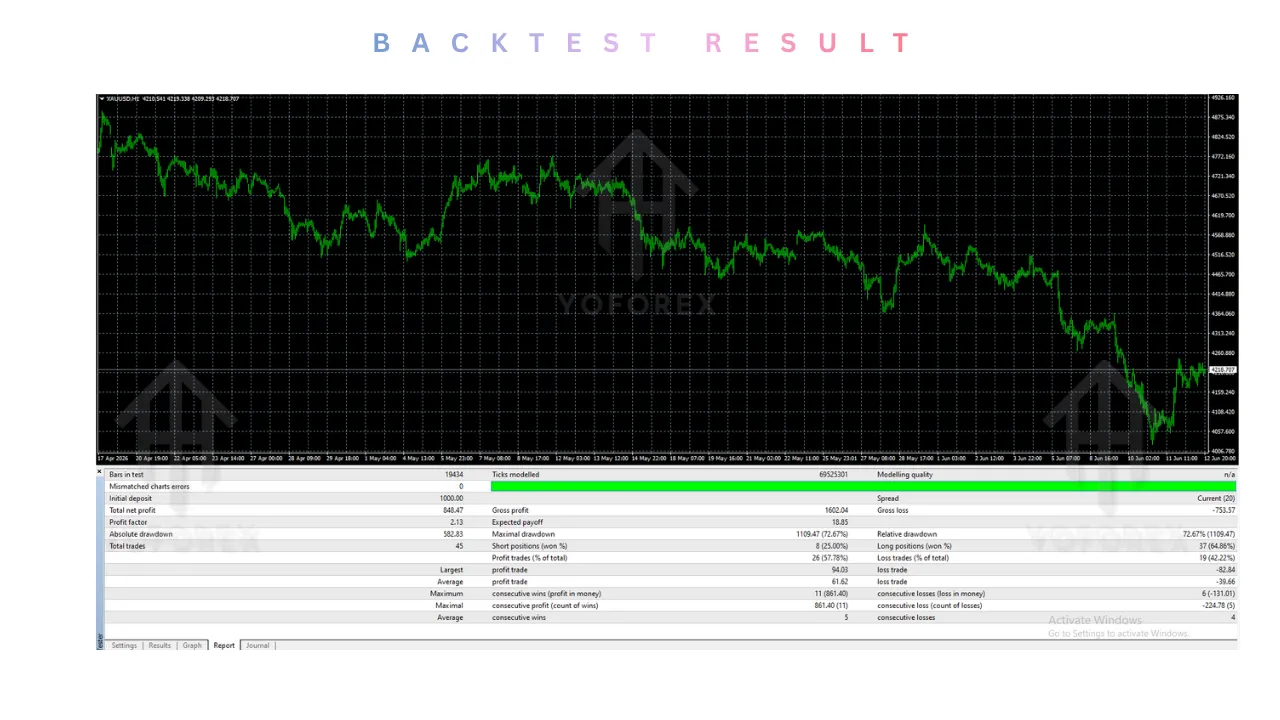
While past performance does not guarantee future results, backtesting the Galaxy 5 EA V1.00 reveals robust engineering. In rigorous tests conducted on high-quality tick data:
- Duration: 4 months of live performance data, with backtests extending to 17+ years
- Total Return: In optimized environments, the multi-strategy approach yielded approximately 146% growth
- Maximum Drawdown: Recorded at a controlled 12.2%. This is exceptionally low for a multi-currency EA and indicates that the Galaxy 5 EA V1.00 manages risk very tightly
- Recovery Factor: The ratio of net profit to drawdown is highly favorable, suggesting the Galaxy 5 EA V1.00 recovers losses quickly
Real-time signal performance has shown approximately 36% profit over two months, further validating the EA’s effectiveness in live market conditions .
Note: These results assume a low-slippage ECN broker and proper VPS hosting.
Installation Guide (MT4)
Getting the Galaxy 5 EA V1.00 live is straightforward. Follow these steps:
-
Locate Data Folder: In your MT4 terminal, go to
File->Open Data Folder. -
Navigate to MQL4: Open the
MQL4folder, then theExpertsfolder. -
Install File: Copy the
Galaxy 5 EA V1.00.ex4file into theExpertsfolder. -
Refresh: Restart MT4 or right-click in the Navigator window and select “Refresh”.
-
Attach: Drag the Galaxy 5 EA V1.00 onto the NZDCAD H1 chart.
-
Settings: Check the “Allow live trading” box and “Allow DLL imports” (if required). Set the Risk % as desired.
-
Go Live: Click OK. The smiley face should appear on the chart.
VPS Recommendation: For 24/5 trading on 8 pairs, a low-latency Virtual Private Server (VPS) is mandatory to ensure the Galaxy 5 EA V1.00 fires orders on time without interruption.
Advantages and Disadvantages
Advantages
- Safety First: The strict “No Grid / No Martingale” policy of the Galaxy 5 EA V1.00 protects the account from exponential drawdowns .
- Diversification: By trading 8 pairs, the Galaxy 5 EA V1.00 smooths out the equity curve; a loss on one pair is often offset by a win on another.
- Prop Firm Optimized: The built-in drawdown controller is specifically designed to pass challenges like FTMO, which requires 10% total drawdown and 5% daily drawdown limits .
- Low Maintenance: Once attached to the H1 chart, the Galaxy 5 EA V1.00 operates autonomously without constant manual adjustment.
- No DLL Requirements: Unlike many complex EAs, the Galaxy 5 EA V1.00 does not require external DLL files, making installation cleaner and more secure .
Disadvantages
- Complexity: For a pure beginner, understanding the interaction between 5 strategies and 8 pairs can be intimidating.
- VPS Required: For 24/5 trading on 8 pairs, a low-latency Virtual Private Server (VPS) is mandatory for the Galaxy 5 EA V1.00.
- Broker Sensitivity: The neural network relies on accurate tick data; dealing desk brokers (market makers) may interfere with the execution.
- Minimum Capital Recommended: While no specific amount is mandated, a larger account (typically $1000+) is recommended to allow the Galaxy 5 EA V1.00 to trade multiple pairs effectively.
Who Should Use Galaxy 5 EA V1.00?
The Galaxy 5 EA V1.00 is not for everyone. It is best suited for:
- Prop Firm Traders: Those looking to pass FTMO or similar challenges will appreciate the strict daily drawdown limits and consistent growth curve of the Galaxy 5 EA V1.00 .
- Conservative Investors: If you have a substantial account and seek steady monthly returns without risking a 50% drawdown, this EA fits.
- Portfolio Managers: Those who already use trend-following EAs can use the Galaxy 5 EA V1.00 as a low-correlation addition to their portfolio.
- Traders Tired of Martingale: If you have lost accounts to grid systems, the Galaxy 5 EA V1.00 offers a refreshing alternative with built-in risk controls.
Why Choose Galaxy 5 EA V1.00 Over Other Forex Robots?
The Forex market is saturated with “lazy” EAs that use dangerous grid systems. Here is why the Galaxy 5 EA V1.00 stands out :
-
Neural Adaptation vs. Fixed Indicators: Most EAs use RSI or MACD with fixed thresholds. Markets change, and fixed thresholds fail. The Galaxy 5 EA V1.00 adapts via its neural network.
-
True Multi-Strategy Approach: While other EAs claim to be multi-strategy, the Galaxy 5 EA V1.00 actually combines 5 distinct logics that work together for a smoother equity curve.
-
No Martingale, No Grid: This cannot be overstated. The Galaxy 5 EA V1.00 avoids the death spiral of increasing lot sizes on losing positions.
-
One Chart Setup: Managing 8 pairs from a single NZDCAD chart is efficient and reduces the chance of user error.
-
Time-Based Exits: Unlike EAs that hold losing positions for weeks, the Galaxy 5 EA V1.00 can close trades that haven’t hit profit within a specific time frame.
-
Prop Firm Compatibility: Built-in drawdown controls make the Galaxy 5 EA V1.00 ready for FTMO challenges without additional risk management EAs.
Conclusion
The Galaxy 5 EA V1.00 represents a solid evolution in retail trading technology. By moving away from high-risk gambling strategies (martingale) and embracing multi-strategy, multi-currency diversification powered by neural networks, it offers a compelling tool for the serious trader .
Our analysis shows that the Galaxy 5 EA V1.00 excels in stability. The combination of a 12.2% maximum drawdown with the ability to trade 8 pairs suggests a highly optimized code base. It is not a “double your money in a week” scam; it is a professional tool for steady growth.
If you are ready to upgrade from standard EAs and want a robot that respects risk management while aggressively seeking profit, the Galaxy 5 EA V1.00 is worth your serious consideration.
Support & Disclaimer
Support
If you need help installing or configuring your EA, or face any kind of bug, feel free to reach out on:
WhatsApp: Click here
Telegram Group: Join our community
Disclaimer:
Forex and gold trading involve risk. Past performance doesn’t guarantee future results. Always test robots on demo before live trading and use proper risk management.
REFERRAL
Join the VIP Signals Telegram Channel for real-time expert trading signals and stay ahead in the forex market. Get personalized strategies by becoming a part of our Real Account Management Telegram Channel and optimize your trading experience. If you’re aiming to Pass PropFirm Challenges , join our dedicated channel for tips and proven methods. Start managing your capital effectively with expert advice from our Funded Account Management Telegram Channel. For advanced traders, our HFT EA / Passing Telegram Channel offers high-frequency trading insights and strategies to boost your performance.