Hydra Signals Indicator MT4 – Complete Trading Guide
The Hydra Signals Indicator is a powerful technical analysis tool designed for traders who want clean, accurate, and rule-based entries on the forex market. Rather than relying on multiple, complicated indicators, Hydra simplifies the entire decision-making process through color-coded arrows, dynamic signal lines, and a momentum confirmation indicator. These elements together create a straightforward trading strategy that both beginners and experienced traders can follow.
This guide breaks down how the indicator works, the exact entry and exit rules, risk-management techniques, and tips to increase win-rate and consistency. If you prefer structured, rule-based trading without overthinking, the Hydra Signals Indicator can be an excellent addition to your trading toolbox.
What Is the Hydra Signals Indicator?
The Hydra Signals Indicator is a visual trading system that generates BUY and SELL signals on the chart and confirms these signals using a momentum-based filter below the main chart window. The indicator uses:
-
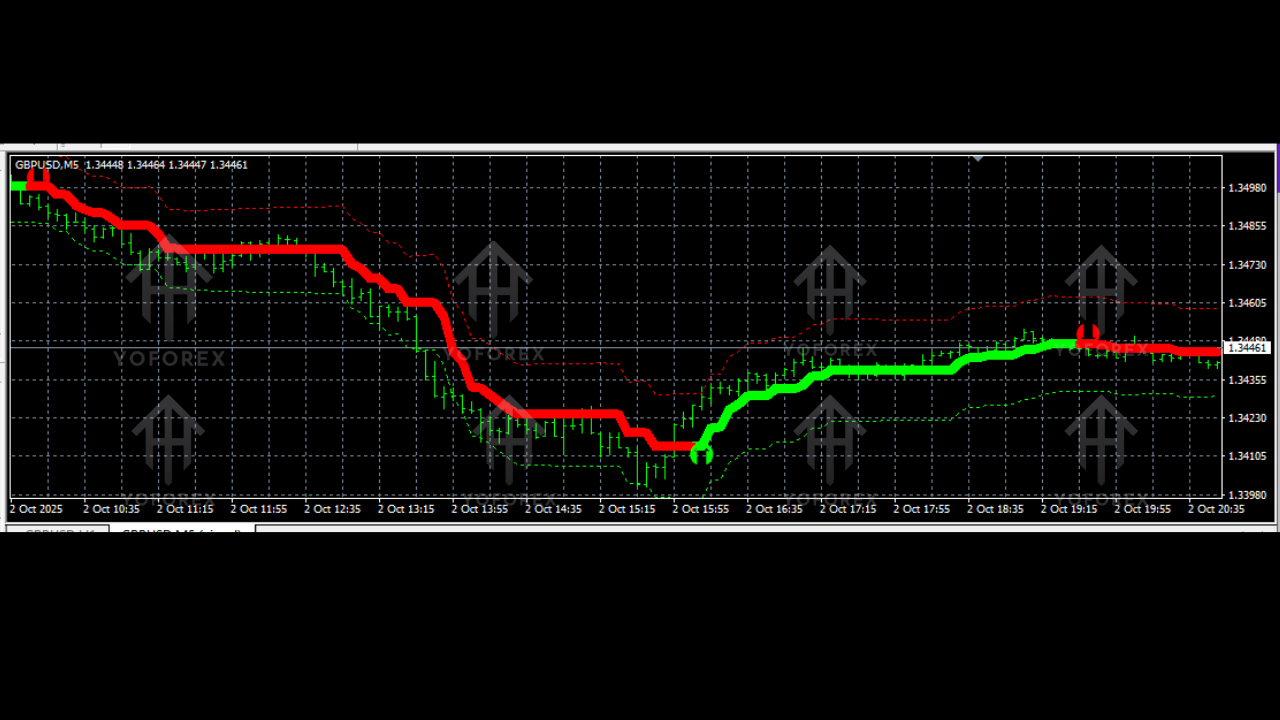
Green arrow + green trading line → BUY signal
-
Red arrow + red trading line → SELL signal
-
Momentum confirmation bar → Validates whether the signal is strong or weak
-
Stop-loss & exit suggestions → Helps maintain disciplined risk management
The indicator works on all major forex pairs, gold (XAUUSD), indices, and even cryptocurrencies. It is best used on M5, M15, M30, and H1 timeframes depending on your trading style.
How the Buy Signal Works
A BUY trade setup occurs when the chart prints:
-
A green arrow pointing upward
-
A green-colored trend line appears
-
The momentum indicator below the chart turns GREEN
When all three conditions are aligned, it signals strong bullish pressure in the market. The indicator identifies potential reversal or continuation zones, ensuring traders enter when momentum supports the move.
Buy Entry Rules
To take a BUY trade:
-
Wait for the green arrow to appear.
-
Confirm that the trend line is green.
-
Check that the momentum bar is green (this is crucial).
-
Enter the BUY trade once all three elements align.
This triple confirmation reduces false entries and helps traders avoid buying into weak reversals.
Where to Place Stop-Loss in Buy Trades
Proper risk management is essential. For a BUY entry, place stop loss at:
-
The nearest lower low, or
-
The nearest support level
The indicator naturally detects trends and pullbacks, so price often respects these zones. Keeping the stop loss below support protects the trade from unexpected pullbacks.
How to Exit Buy Trades
There are three exit strategies:
1. Fixed Take Profit (Recommended)
Set a target based on your trading style:
-
Scalpers: 10–20 pips
-
Day traders: 30–60 pips
-
Swing traders: 80–150 pips
2. Opposite Signal Exit
If a red arrow appears and the momentum indicator turns red, close the BUY position immediately.
3. Trailing Stop Exit
Use a trailing stop to lock profits as price moves upward. This method is useful in strong trends where fixed take profit might limit long-term gains.
How the Sell Signal Works
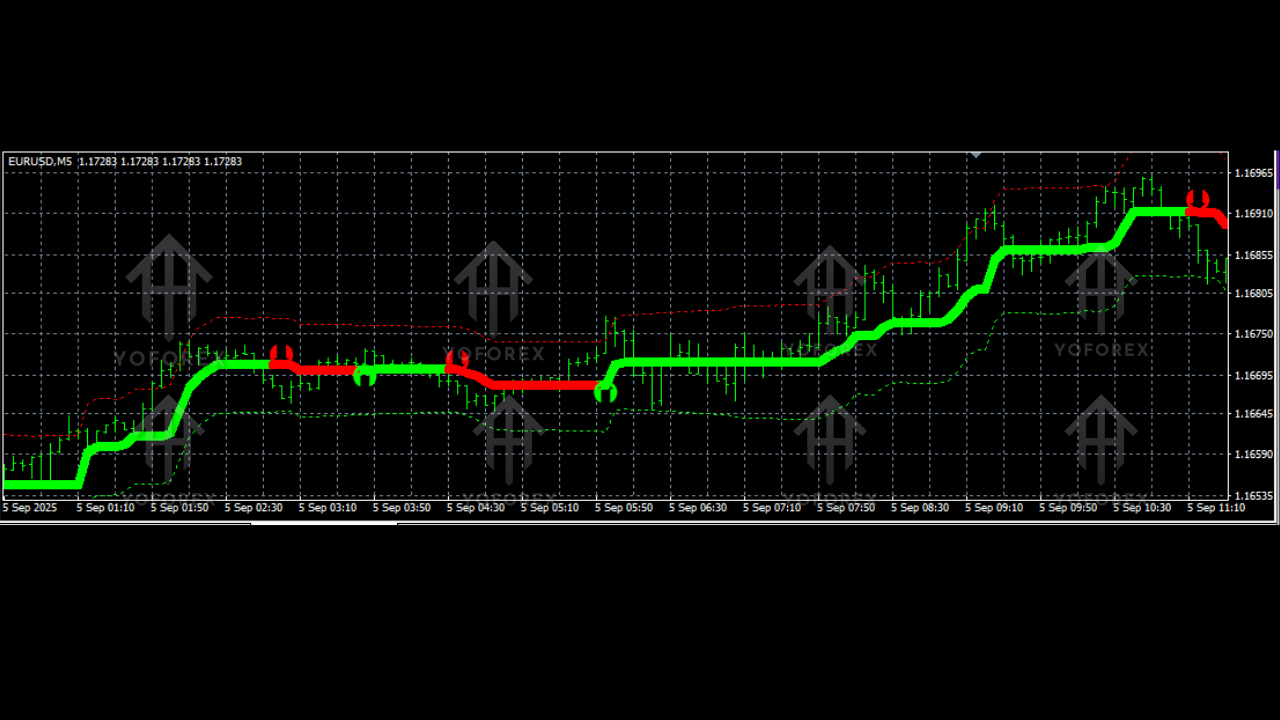
A SELL setup occurs when:
-
A red arrow appears pointing downward
-
A red-colored trend line forms
-
The momentum indicator below the chart turns RED
This combination reflects bearish strength and indicates an opportunity to enter short trades.
Sell Entry Rules
To execute a SELL trade:
-
Wait for the red arrow on your chart.
-
Confirm the trend line is colored red.
-
Check the momentum bar is red.
-
Place the SELL trade only when all confirmations align.
This avoids entering prematurely during weak downward corrections.
Where to Place Stop-Loss in Sell Trades
For SELL entries, place stop loss at:
-
The nearest higher high, or
-
The nearest resistance level
This helps protect the trade in case the market creates a false breakout or short-term pullback.
How to Exit Sell Trades
You can exit SELL trades using:
1. Fixed Take Profit
Target suggestions:
-
Scalpers: 10–20 pips
-
Day traders: 30–60 pips
-
Swing traders: 80–150 pips
2. Opposite Signal Exit
If a green arrow appears and momentum turns green, exit immediately.
3. Trailing Stop
A trailing stop helps follow extended downtrends and capture large moves.
Why Momentum Confirmation Matters
One of the strongest components of the Hydra Signals Indicator is the momentum confirmation window. Many indicators give arrows or signal lines, but Hydra adds a second layer of validation to reduce noise and filter out weak signals.
Momentum confirmation ensures:
-
The price is moving strongly in the indicated direction
-
The signal is not a minor correction
-
The trend has strength behind it
-
The entry has higher probability of success
Trading only when the signal aligns with momentum greatly reduces stop-loss hits.
Best Timeframes to Use
Hydra Signals Indicator works well on:
-
M5 – For scalping sessions
-
M15 – For intraday trades
-
M30 / H1 – For swing and trend-following trades
Higher timeframes produce fewer signals, but they are generally more reliable.
Best Pairs and Markets
The indicator performs strongly on:
-
XAUUSD (Gold)
-
EURUSD, GBPUSD, USDJPY
-
US30, NAS100, GER40
-
BTCUSD, ETHUSD
Gold and indices work especially well due to the momentum-based algorithm used in Hydra.
Risk Management Tips
No trading strategy is perfect, and risk control is essential. Follow these tips for better results:
1. Always Trade with Stop Loss
Many traders skip stop loss, leading to margin calls. Hydra provides clear stop loss guidelines—use them.
2. Risk 1–2% Per Trade
Consistency matters. Avoid risking high percentages of your capital.
3. Use Momentum as the Filter
If the signal arrow appears but momentum does not confirm, skip the trade.
4. Avoid Trading During High-Impact News
NFP, CPI, FOMC, and other red-folder news events can distort indicator signals.
5. Trade Only in Active Market Sessions
London and New York are the best for reliable movement.
Hydra Signals Indicator Trading Workflow
Here is a simple trading routine using Hydra:
-
Wait for a signal arrow (green/red).
-
Check the color of the trend line.
-
Confirm with momentum indicator.
-
Place stop loss at nearest high/low.
-
Choose your exit method:
-
Fixed TP
-
Opposite signal
-
Trailing stop
-
-
Let the trade run without interference.
This systematic approach removes emotional trading and helps maintain a profitable strategy.
Advantages of Hydra Signals Indicator
-
Easy-to-read visual signals
-
Extremely beginner-friendly
-
Works on all markets
-
Adaptable to different strategies
-
High accuracy when using momentum confirmation
-
Supports trend trading and scalping
-
Offers clear stop loss and exit guidance
Final Thoughts
The Hydra Signals Indicator is a complete trading system that simplifies chart analysis. With arrow signals, trend lines, and a momentum filter, it provides high-probability entry opportunities without clutter. While no indicator guarantees 100% accuracy, Hydra delivers consistent and reliable signals if used properly with stop loss and correct risk management.
Traders who follow the rules — signal, trend line, momentum, and proper exit — can achieve steady results and avoid emotional decision-making. Whether you’re a beginner or an experienced trader, the Hydra Signals Indicator can become one of your most valuable tools for identifying strong trade setups and catching high-quality market moves.