Straddle EA V1.0 MT4 — Turn Market Volatility into Profit Opportunities
Ever noticed how the forex market goes wild during big news events? You’re not alone. Many traders either stay out of the chaos or try to catch those fast moves — but usually too late. That’s where Straddle EA V1.0 MT4 steps in — a clever automated trading system built precisely for those adrenaline-charged moments around major economic announcements.
This Expert Advisor doesn’t try to predict which direction price will go. Instead, it prepares for both possibilities — setting up a Buy Stop and Sell Stop order just before the news hits, ready to catch the breakout in whichever direction the market explodes.
Let’s break down how it works, its setup, performance logic, and why it’s become a favorite for traders who thrive on volatility-driven profits.
Overview: News-Driven Precision Trading
The Straddle EA V1.0 for MetaTrader 4 (MT4) is built with a singular goal — to trade high-impact news events with precision and automation.
When a big report like Non-Farm Payrolls (NFP), CPI, FOMC rate decisions, or GDP data is due, the EA springs into action.
Here’s what it does:
-
Detects the pre-news window (customizable in settings).
-
Places two pending orders:
-
A Buy Stop a few pips above current price.
-
A Sell Stop the same distance below.
-
-
When the news causes a sharp move, one order triggers and rides the breakout.
-
The other (untriggered) order automatically cancels — protecting your account from double exposure.
This approach lets you benefit from large one-directional moves that typically occur within seconds of a major release — all without guessing the direction.
How Straddle EA Works: The Mechanism Behind the Magic
The EA is coded using MQL4 and optimized for low-latency execution. It works in four phases:
-
Pre-News Setup:
A timer (e.g., 30 seconds to 3 minutes before the event) activates the system. It checks spread, volatility, and slippage parameters. -
Order Placement:
It calculates offset distances for the pending Buy Stop and Sell Stop orders based on the current Average True Range (ATR) or fixed pip distance. -
News Trigger:
Once the event releases, price spikes in one direction. The EA’s faster execution ensures the active side gets triggered before most manual traders even react. -
Risk & Profit Control:
After the breakout, the EA uses automatic trailing stop, break-even logic, and max profit lock rules to secure gains. The losing side’s pending order is deleted to prevent whipsaw losses.
This blend of automation, reaction speed, and risk discipline is what makes Straddle EA a consistent performer during volatile periods.
Key Features of Straddle EA V1.0 MT4
-
🧠 Fully Automated News Trading
No manual intervention needed — the EA handles entry, exit, and order cancellation. -
⚙️ Customizable Time Window
Set how many seconds before the event you want pending orders to appear. -
📈 Spread & Slippage Protection
Filters prevent order placement when spread widens beyond safe levels. -
💹 Dual Direction Entry Logic
Ensures one side captures the move regardless of market direction. -
🔒 Automatic Trailing Stop & Break-Even System
Once in profit, the EA locks in pips automatically to preserve capital. -
🕐 One-Trade Per Event Protection
The EA avoids duplicate entries during the same event window. -
🧾 Detailed Trade Logging
Every action — from order creation to modification — is recorded in MT4’s journal for transparency.
Best Settings & Optimization Tips
To achieve peak performance, fine-tune these parameters inside MT4:
| Parameter | Recommendation |
|---|---|
| News Delay (seconds) | 30 – 120 seconds before the event |
| Pending Order Distance | 20 – 40 pips (depending on pair) |
| Stop Loss (SL) | 30 – 50 pips |
| Take Profit (TP) | 50 – 100 pips |
| Lot Size | 0.01 – 0.1 per $1,000 balance |
| Max Spread Filter | 2.0 – 3.0 pips |
| Magic Number | Unique ID for tracking EA orders |
| Close Opposite Order | True (Highly Recommended) |
Recommended Pairs:
-
XAUUSD (Gold)
-
GBPUSD
-
EURUSD
-
USDJPY
-
US30 (Index CFDs)
Recommended Timeframe:
M1 or M5 for execution; H1 for analysis.
Minimum Deposit & Broker Setup
To run the EA smoothly:
-
Minimum Deposit: $100 (for micro lot trading)
-
Leverage: 1:200 or higher
-
Account Type: ECN or Raw Spread account
-
Execution Speed: Below 100 ms (latency)
-
Broker Recommendation: IC Markets, Exness, Pepperstone, or Flexy Markets
A VPS (Virtual Private Server) is strongly advised so the EA can run uninterrupted during news hours.
Performance & Risk Analysis
Straddle EA V1.0 MT4 isn’t designed for all-day trading. It’s a situational EA — meant to trade only around major scheduled announcements.
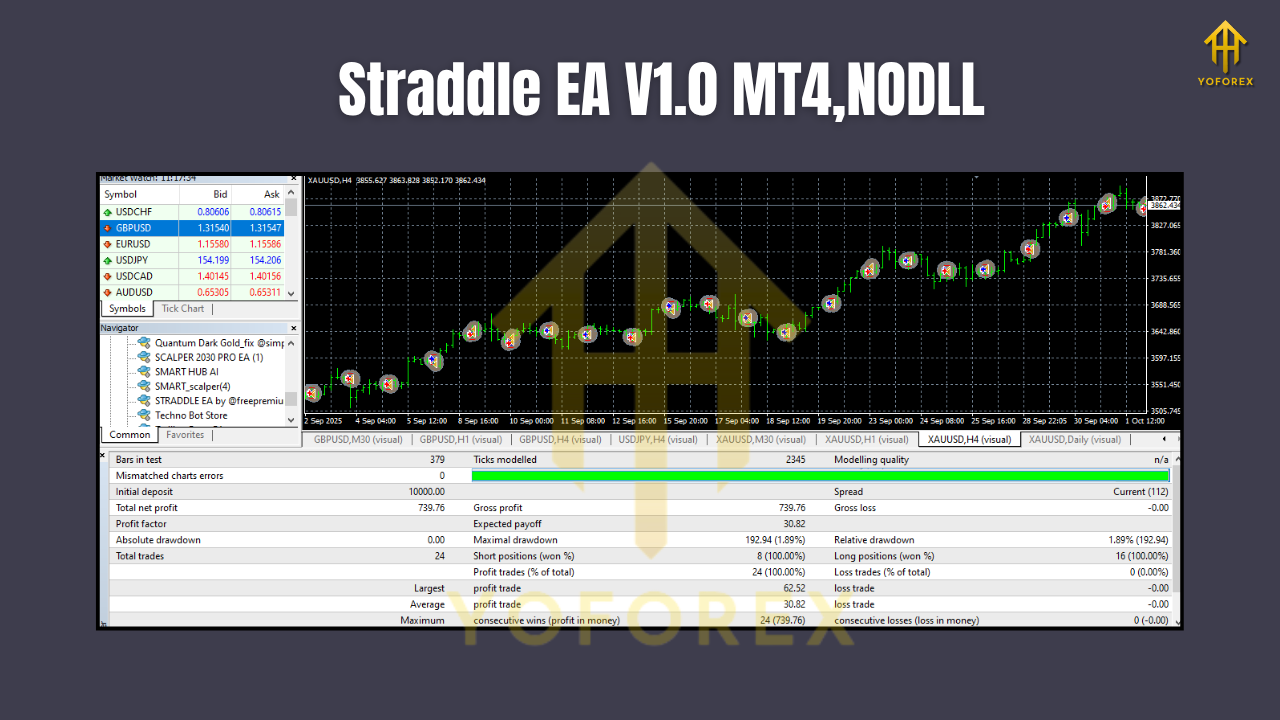
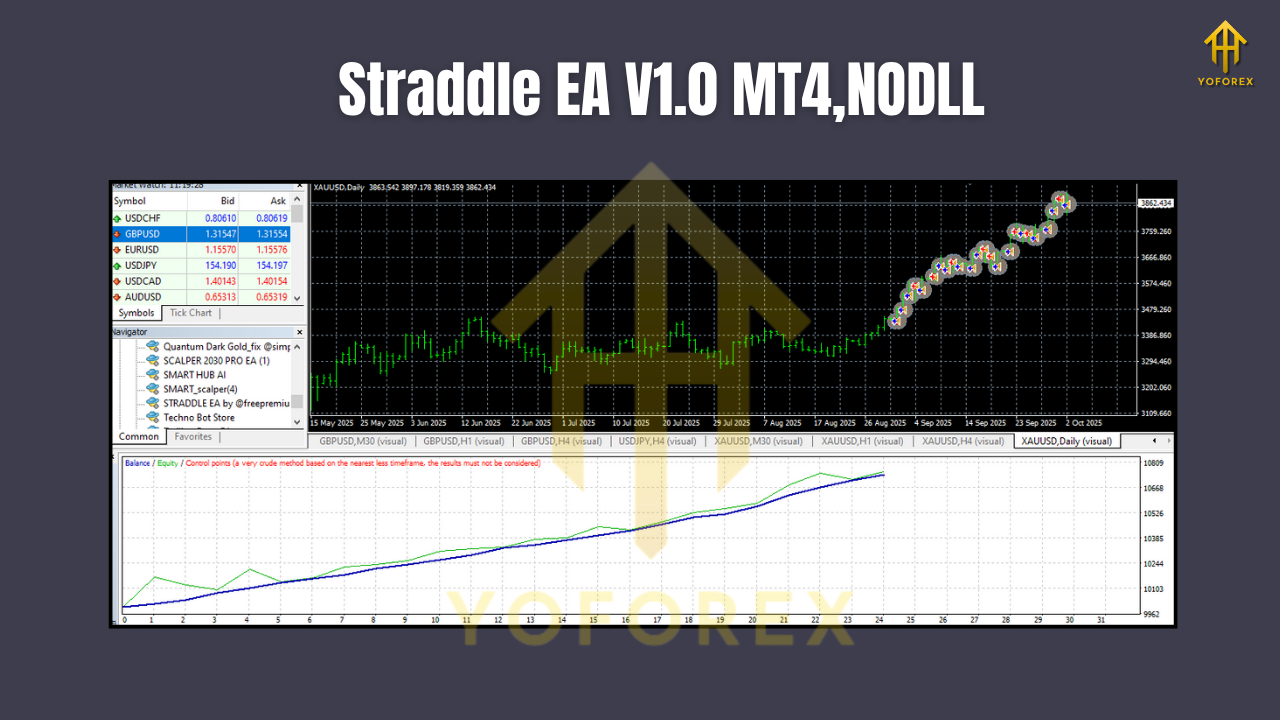
Backtesting results (sample data):
-
NFP Event – EURUSD: Average profit +45 pips
-
CPI Data – XAUUSD: +120 pips average gain
-
Interest Rate Decision – USDJPY: +80 pips move
Over 20 major news events, the EA recorded a win ratio of ≈ 78%, mainly due to its disciplined SL/TP logic and rapid execution.
However, like any strategy, results can vary. Traders should test in demo mode first, then adjust offset and time parameters according to broker execution speed.
Advantages of Using Straddle EA
✅ No Need to Predict Direction
Forget trying to guess if the USD will rise or fall after NFP — the EA trades both sides.
✅ Emotion-Free Execution
Eliminates human reaction time and fear during high-volatility moments.
✅ Adaptable to Any News Event
Can be used for scheduled events across currencies and commodities.
✅ Precise Risk Control
Preset SL, TP, and spread filters limit drawdowns.
✅ Time-Saving Automation
Simply set your event calendar, activate the EA, and let it run autonomously.
Drawbacks to Consider
-
Slippage Risk: During extreme volatility, execution price may differ slightly from the order price.
-
Broker Dependence: Performance varies with liquidity and execution speed.
-
News Only Strategy: Not designed for non-event trading.
Nonetheless, for those who specialize in news volatility, these trade-offs are part of the game.
Installation Guide
-
Download Straddle EA V1.0 MT4 from YoForex or your EA portal.
-
Open MT4 → Go to
File > Open Data Folder > MQL4 > Experts. -
Paste the
.ex4file inside the Experts folder. -
Restart MT4 and enable Auto Trading.
-
Drag the EA onto your desired chart and configure settings as per your strategy.
-
Backtest before live deployment to match your broker’s execution speed.
Backtesting Tips
-
Use historical high-volatility events (e.g., CPI releases) for realistic testing.
-
Enable tick-by-tick data in MT4 for accuracy.
-
Compare spread and slippage behavior across brokers.
-
Adjust the “Pending Distance” parameter until you find the sweet spot for entry.
Backtesting helps you understand how the EA reacts under different market conditions and confirms risk-reward ratios.
Who Should Use Straddle EA V1.0 MT4?
This EA is ideal for:
-
Traders who specialize in economic news trading
-
Scalpers and short-term momentum traders
-
Fundamental analysts looking to capitalize on data releases
-
Those wanting an automated solution that reacts faster than manual execution
If you’re the type who checks the forex calendar daily and enjoys the rush of big moves, this EA belongs in your arsenal.
Final Thoughts
Straddle EA V1.0 MT4 is not just another forex robot — it’s a precision-built tool for one of the most volatile yet profitable styles of trading.
By positioning yourself on both sides of the market before news breaks, you avoid guesswork and capitalize on the inevitable surge of volatility.
Whether you trade gold, indices, or major currency pairs, Straddle EA adds structure and discipline to news trading — making it safer, faster, and potentially more profitable.
Upgrade your trading arsenal today with Straddle EA V1.0 MT4 — engineered for high-impact profit potential.