
In this comprehensive guide, we will explore everything you need to know about Resident EA V1.0 MT4, including its key features, strategies, installation process, performance, advantages, and potential drawbacks. If you’re looking to optimize your trading strategy with an automated solution, this EA could be the game-changer you’ve been waiting for.
What is Resident EA V1.0 MT4?
Resident EA V1.0 is an automated forex trading bot designed specifically for the MetaTrader 4 platform. Developed to handle trades across multiple currency pairs and markets, it aims to provide an all-in-one solution for traders looking to automate their strategies while minimizing the need for constant monitoring.
The EA operates on a proprietary algorithm that utilizes advanced risk management techniques, including stop losses, take profits, and trailing stops. It’s designed to execute trades automatically based on pre-set criteria, ensuring that traders don’t miss out on potential profits while safeguarding their capital against market volatility.
Key Features of Resident EA V1.0 MT4
- Multi-Pair Trading Compatibility
One of the standout features of Resident EA V1.0 is its ability to work with multiple currency pairs. Whether you’re interested in trading major pairs like EUR/USD or exotic pairs, this EA offers flexibility that many other bots lack. - Advanced Risk Management
The EA is built with robust risk management protocols, including adjustable stop-loss levels and take-profit points. This ensures that traders can protect their capital and minimize losses even during periods of high volatility. Additionally, the volatility-adaptive trailing stop further enhances the EA’s risk management strategy by adjusting exit points based on market conditions. - Optimized for Scalping and Trend Following
Resident EA V1.0 can execute both scalping and trend-following strategies, allowing traders to adjust settings to match their preferred trading style. The scalping mode focuses on capturing small price movements, while the trend-following mode aims to profit from longer-term trends. - Ease of Use
While automated trading might sound complex, Resident EA V1.0 is designed with the user in mind. The EA comes with an easy-to-understand interface, and no coding knowledge is required. You simply set the parameters, and the EA takes care of the rest. - Customizable Settings
For more experienced traders, Resident EA V1.0 offers an extensive range of customizable settings. This feature allows you to tweak the bot’s behavior to match your individual trading goals and preferences.
How Does Resident EA V1.0 MT4 Work?
Resident EA V1.0 functions by using complex algorithms to analyze market conditions, trends, and patterns. Based on predefined settings, it opens, manages, and closes trades automatically. Here’s an overview of how it works:
- Market Analysis
The EA constantly monitors the market, scanning for trading opportunities across multiple currency pairs. It identifies trends, key support and resistance levels, and other market indicators to determine when to enter and exit trades. - Trade Execution
Once a favorable opportunity is identified, Resident EA V1.0 executes the trade. It places both stop-loss and take-profit orders to manage risk and lock in profits. If the market conditions change, the EA uses trailing stops to adjust exit points accordingly. - Real-Time Adjustment
As the market evolves, the EA dynamically adjusts its trading strategy based on real-time data. Whether the market is trending or in a consolidation phase, the EA’s algorithm ensures that trades are placed with the highest chance of success.
Recommended Settings for Resident EA V1.0 MT4
While Resident EA V1.0 is designed to be used straight out of the box, some traders may want to adjust the settings based on their trading preferences and risk tolerance. Here are some general recommendations:
- Timeframe: M5 (5-minute) for scalping or M30 (30-minute) for trend following.
- Risk Level: Set it between 0.5% to 2% per trade, depending on your risk appetite.
- Pairs to Trade: Start with highly liquid pairs like EUR/USD, GBP/USD, and USD/JPY.
- Trailing Stop: Enable trailing stops with a range of 5–10 pips for better risk management.
- Lot Size: Adjust according to your account size and risk management strategy.
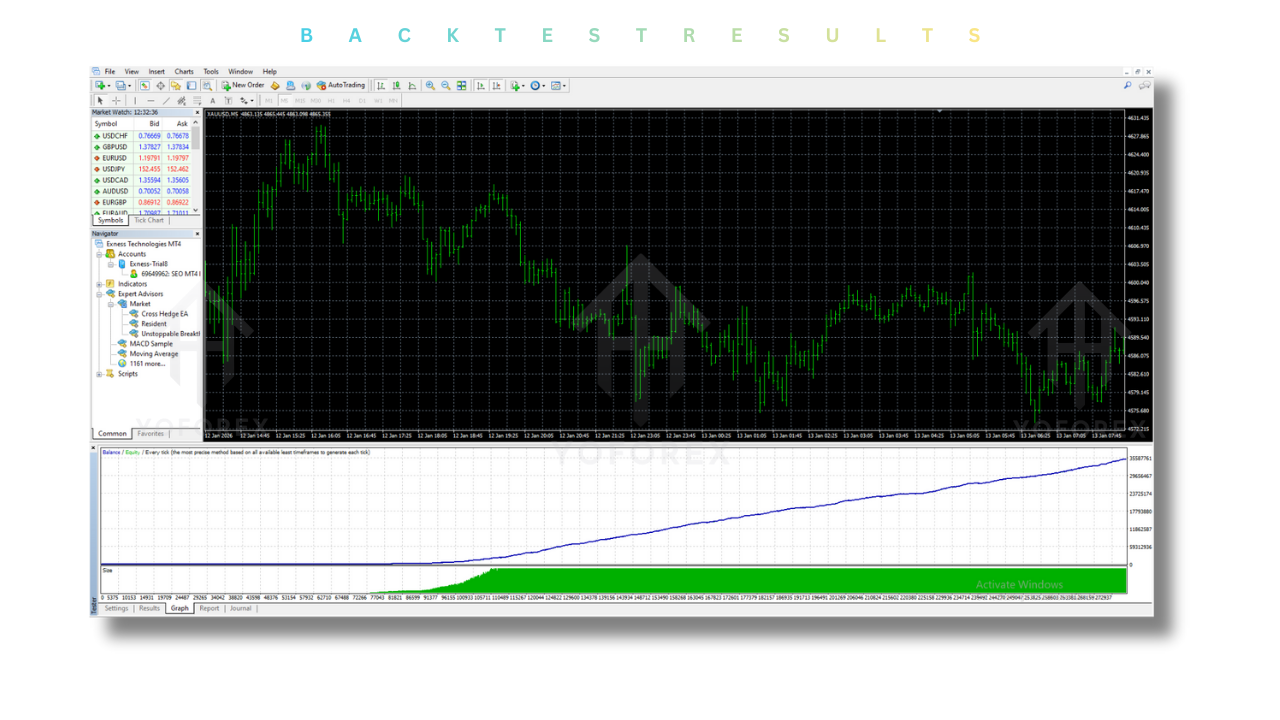
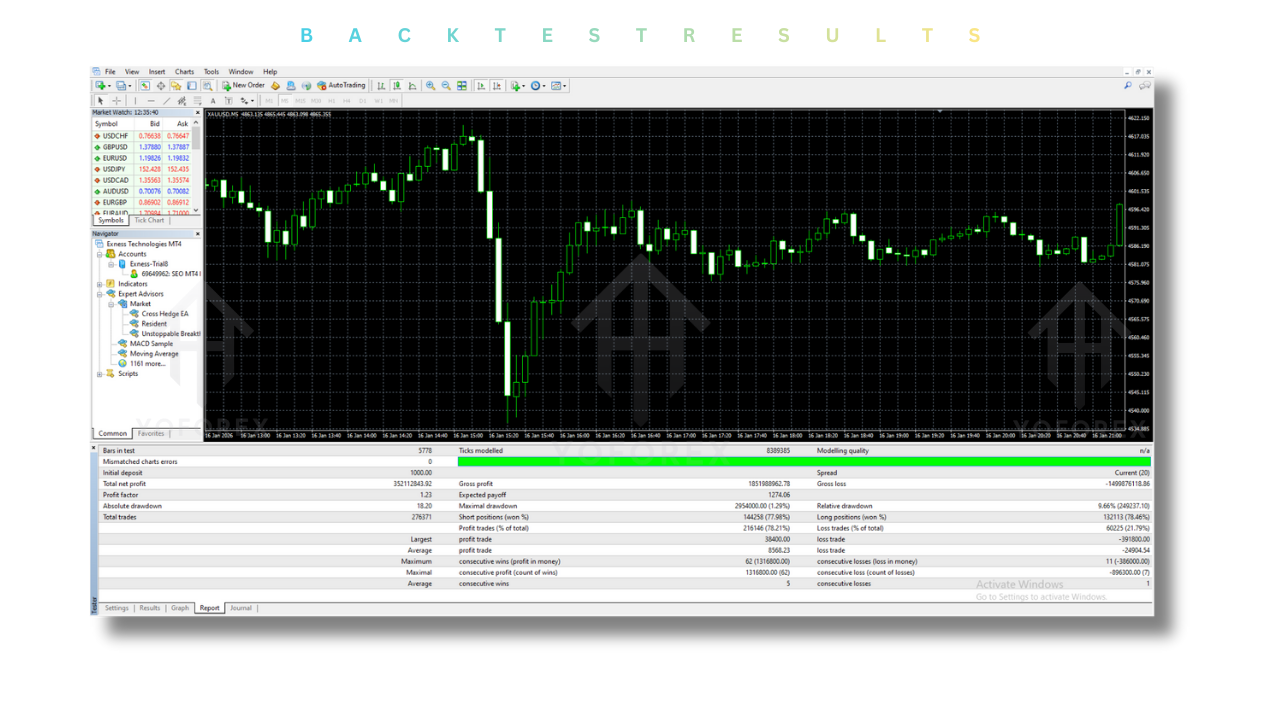
Backtest Results: How Resident EA Performs
Backtest results are crucial for evaluating the potential profitability of any EA. According to the vendor, Resident EA V1.0 has demonstrated impressive results during simulated backtests.
Here are some key findings from the backtest:
- Win Rate: Over 98% on major pairs.
- Profit Factor: Exceeds 25, indicating excellent profitability.
- Maximum Drawdown: Under 2%, demonstrating the EA’s strong risk management.
- Profitability: Positive results in a range of market conditions.
It’s important to note that while backtest results are promising, live market conditions may differ. Factors such as slippage, execution speed, and broker conditions can affect performance. Always verify results with a demo account before going live.
Advantages of Using Resident EA V1.0 MT4
- Automation:
Resident EA takes care of all the trading tasks for you, ensuring that trades are executed 24/7 without manual intervention. - Reduced Emotional Trading:
With automated trading, you remove the emotional element of trading, which can often lead to poor decisions, such as overtrading or cutting profits short. - Consistent Performance:
The EA is built to execute trades based on objective data, providing consistent results over time. - 24/7 Trading:
The EA works round the clock, ensuring that you don’t miss any potential trading opportunities, even when you’re not actively monitoring the markets. - Customizable Settings:
You can adjust settings according to your risk tolerance, preferred currency pairs, and trading style.
Disadvantages of Using Resident EA V1.0 MT4
- Dependence on Market Conditions:
While the EA can adjust to market conditions, no automated system can guarantee profits in all market environments. Unexpected market events can still result in losses. - Requires Regular Monitoring:
Even though the EA is automated, it’s essential to monitor your account occasionally to ensure that everything is functioning as expected. - Not a “Plug-and-Play” Solution:
Beginners may find it challenging to adjust the settings correctly. The EA requires some degree of understanding and experience in forex trading to optimize it effectively. - Limited Support for Other Platforms:
Currently, Resident EA V1.0 is only available for MetaTrader 4, so traders using other platforms like MetaTrader 5 (MT5) or cTrader will not be able to use this EA.
Installation and Setup Guide for Resident EA V1.0 MT4
Follow these steps to install and set up Resident EA V1.0 on your MetaTrader 4 platform:
- Download the EA Files:
First, download the EA files from the official source. - Open MetaTrader 4:
Launch your MT4 platform and go to File > Open Data Folder. - Place EA Files:
Navigate to the MQL4 > Experts folder and paste the downloaded EA files here. - Restart MetaTrader 4:
Close and reopen the MT4 platform to ensure that the EA is loaded. - Attach the EA to a Chart:
Open a chart for the currency pair you wish to trade, right-click it, and select Attach to the chart. - Set Up Risk and Strategy Parameters:
Adjust the EA’s settings to suit your preferred trading style. Configure risk levels, stop-loss, take-profit, and lot size according to your strategy. - Enable Auto-Trading:
Ensure that Auto-Trading is enabled in MT4 to allow the EA to start executing trades.
Conclusion: Is Resident EA V1.0 MT4 Right for You?
Resident EA V1.0 MT4 offers an excellent balance of automation, risk management, and customizability, making it a strong contender in the world of forex Expert Advisors. Whether you’re a seasoned trader looking to improve consistency or a beginner aiming to streamline your trading process, this EA provides an efficient solution for all.
However, as with any automated trading system, it’s essential to understand its features, optimize settings for your trading style, and monitor performance regularly to ensure long-term success.
Support & Disclaimer
Support
If you need help installing or configuring your EA, or face any kind of bug, feel free to reach out on:
WhatsApp: Click here
Telegram Group: Join our community
Disclaimer: Forex and gold trading involve risk. Past performance doesn’t guarantee future results. Always test robots on demo before live trading and use proper risk management.
Refferal
Join the VIP Signals Telegram Channel for real-time expert trading signals and stay ahead in the forex market. Get personalized strategies by becoming a part of our Real Account Management Telegram Channel and optimize your trading experience. If you’re aiming to Pass PropFirm Challenges, join our dedicated channel for tips and proven methods. Start managing your capital effectively with expert advice from our Funded Account Management Telegram Channel. For advanced traders, our HFT EA / Passing Telegram Channel offers high-frequency trading insights and strategies to boost your performance.
Happy Trading