
Golden Apex EA V1.0 MT4 – Precision Automation for Gold & Major FX
Golden Apex EA V1.0 for MetaTrader 4 is built for traders who want disciplined, repeatable execution in fast-moving markets—especially gold. Designed by experienced quant developers and tested across multiple volatility regimes, the EA focuses on clean signal logic, robust risk controls, and lightweight performance so it can run smoothly on most MT4 setups.
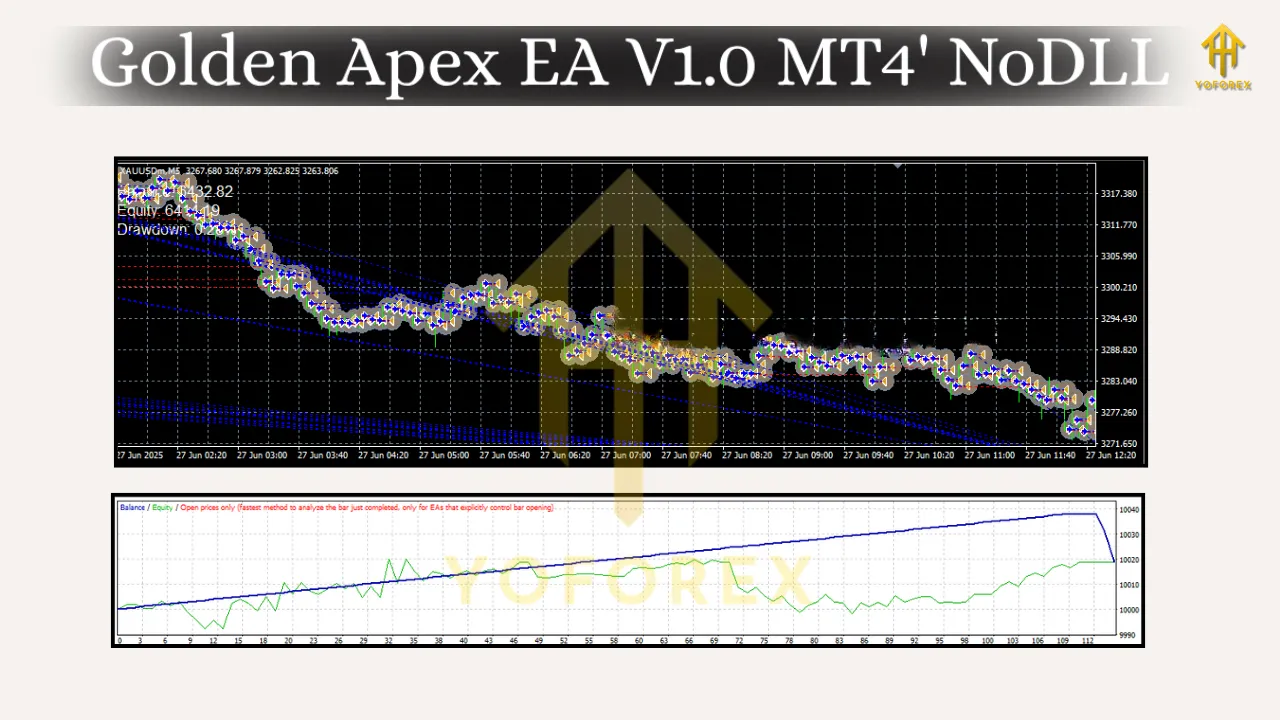
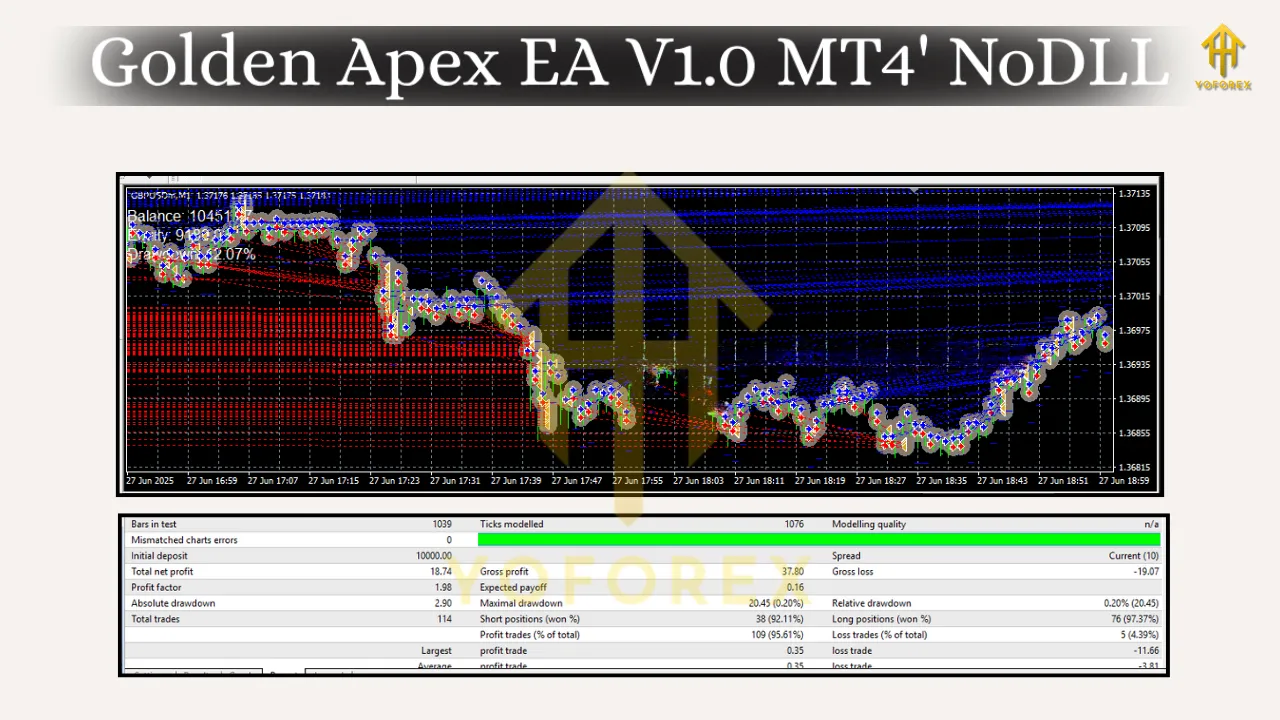
Working pairs: XAUUSD (Gold), GBPUSD
Recommended timeframes: M1, M5
Minimum deposit: $500
Why Golden Apex EA?
Gold (XAUUSD) is notorious for sharp spikes and sudden reversals. Manual trading often struggles to keep up with the speed and emotional pressure. Golden Apex EA removes the guesswork by applying a systematic approach: identify high-probability momentum bursts, filter out noise, and manage risk with strict rules. On GBPUSD, the logic adapts to session-driven volatility (London/NY overlap) to capture intraday swings without overtrading.
What you can expect:
-
Consistent execution of a proven rule set
-
Risk first: built-in equity protection and per-trade caps
-
Compatibility with prop-firm style risk rules when configured conservatively
-
Clean inputs so you can tune position sizing, filters, and sessions without confusion
Note: No EA can guarantee profits. Golden Apex EA aims for consistency and discipline, not perfection.
How the Strategy Works (High Level)
Golden Apex EA blends momentum confirmation with volatility filters:
-
Volatility Gate: The EA evaluates recent range expansion (ATR-like logic). If volatility is too low or excessively high, it stands down to avoid chop or whipsaws.
-
Momentum Trigger: A short-term impulse signal (based on price action and micro-structure) confirms direction. This helps avoid “early” entries.
-
Smart Entries: The EA prefers trading in alignment with immediate direction while avoiding extended overbought/oversold extremes.
-
Protective Exits: Dynamic stop loss is set relative to current volatility; take-profit logic can scale out or hard-exit depending on your chosen mode.
-
Session Awareness: Optional session filters help prioritize the most liquid hours (e.g., London open, NY overlap for XAUUSD and GBPUSD).
-
News Stand-Down (Optional): If you enable news avoidance (via external filter or time-based blackout windows), the EA pauses around major releases.
Key Features
-
Dual-Pair Optimization: Native support for XAUUSD; tuned logic for GBPUSD intraday swings.
-
M1/M5 Execution: Lower timeframes for faster signal confirmation and tight risk.
-
Risk Modules: Per-trade SL/TP, equity-based shutdown, daily drawdown cap, and optional trailing logic.
-
Trade Management Modes: Choice of fixed TP, trailing TP, or partial scaling where broker conditions allow.
-
Capital Efficiency: Efficient CPU footprint; suitable for running alongside other tools on a standard VPS.
-
Customizable Sessions: Trade only the hours that match your risk appetite and lifestyle.
Recommended Settings (Starting Point)
Use these as conservative baselines and evolve them after your own backtests and forward tests.
General
-
Account type: ECN/Raw spread (tight spreads matter on M1/M5)
-
Leverage: 1:200 to 1:500
-
VPS latency: Preferably < 30 ms to broker
Risk
-
Minimum deposit: $500
-
Position sizing: 0.01–0.03 lots per $500 on XAUUSD (conservative); 0.02–0.05 per $500 on GBPUSD depending on spread/volatility
-
Max simultaneous trades: 1–3 (start with 1 for simplicity)
-
Daily loss limit: 3–5% of equity (EA stops trading for the day if hit)
Stops & Targets
-
Stop Loss: 1.2–1.8× recent ATR (dynamic)
-
Take Profit: 1.0–1.5× SL for momentum bursts; consider enabling a tight trailing stop once price moves 0.8× SL in favor
Sessions
-
XAUUSD: London open to early NY (e.g., 07:00–17:00 UTC)
-
GBPUSD: London and NY overlap focus (08:00–16:00 UTC)
Filters
-
Spread filter: Block trades if spread > 30–40 points on XAUUSD; > 20–25 points on GBPUSD
-
News window: Pause 10–15 minutes before/after Tier-1 events if your broker and setup support a news filter or if you manually block via time windows
Installation & Setup (MT4)
-
Copy Files: Place the EA
.ex4file inMQL4/Experts/and any provided set files inMQL4/Presets/. -
Restart MT4: Or refresh the Navigator panel.
-
Enable Algo Trading: Tools → Options → Expert Advisors → allow algo trading; also allow DLL imports if required.
-
Attach to Chart: Open XAUUSD M1 or M5 (or GBPUSD), drag the EA onto the chart.
-
Load Preset: In Inputs, click “Load” and select the included
.setfile as a starting point. -
Set Risk Parameters: Choose lot size model (fixed or balance-based), max daily drawdown, and session hours.
-
Check Smile Face: Ensure the smiley in the top-right is happy (algo trading enabled) and no errors appear in the Experts/Journal tabs.
-
Forward Test: Run on a demo or small live allocation first to validate fills and broker behavior.
Backtesting & Optimization Tips
-
Data Quality: Use high-quality tick data if possible to better simulate M1/M5 behavior.
-
Walk-Forward Validation: Optimize over a past window (e.g., 3–6 months), then test on the next month out-of-sample to avoid curve-fit bias.
-
Regime Checks: Test across quiet, trending, and high-volatility months. Gold’s behavior can change dramatically.
-
Parameter Discipline: Don’t over-optimize. Keep inputs simple and robust (few knobs, wide plateaus).
-
Broker Conditions: Recreate your broker’s spread/commission in the tester to avoid surprises.
Risk Management Philosophy
Golden Apex EA is built around the idea that defense wins seasons:
-
Hard Stops Always: No martingale, no grid averaging without stops. Every trade has a defined exit.
-
Daily Circuit Breaker: If daily drawdown hits your limit (e.g., 3%), the EA stands down—no “revenge” trading.
-
Size Scales with Equity: Use fixed fractional risk or fixed lots aligned with your balance and comfort.
-
Diversification: If you run both XAUUSD and GBPUSD, consider lower lots per symbol rather than concentrating risk on one pair.
Broker, VPS & Execution
-
Broker: Low spread, low commission, and stable execution are critical, especially on M1/M5.
-
VPS: Choose a data center close to your broker to reduce slippage. Keep the VPS dedicated and up to date.
-
Slippage Controls: Use built-in max slippage or price deviation settings where available.
Who Is It For?
-
Active intraday traders who prefer systematic execution over discretionary decisions
-
Gold specialists looking for a rules-based approach to harness volatility
-
Prop-firm aspirants who need consistent risk caps and session discipline
-
Busy professionals who want automation to monitor and execute while they focus on analysis and strategy
Best Practices for Going Live
-
Demo First: Run for at least 1–2 weeks to confirm broker fills and your VPS stability.
-
Start Small: Begin with minimal lot sizes; scale only after consistent results and no technical issues.
-
Weekly Review: Check trade logs, average slippage, spread spikes, and news-time behavior.
-
One Change at a Time: When tuning inputs, adjust one parameter per week to clearly see its effect.
-
Keep Records: Maintain a simple performance sheet (win rate, avg R, max DD, profit factor) for accountability.
Final Word
Golden Apex EA V1.0 MT4 brings structure and discipline to two of the most traded instruments—gold and GBPUSD. It’s not a “set and forget forever” robot; it’s a professional tool that rewards traders who respect risk, keep settings conservative, and review performance regularly. Start with the recommended templates, track results, and evolve your configuration with data—not emotion.