
Alien Mattrix EA V1.0 MT4 – Automated Gold (XAUUSD) Trading Robot for M15
Introduction
Gold (XAUUSD) is one of the most traded instruments in the retail market because it moves fast, reacts strongly to news, and often trends with intensity. But the same volatility that creates opportunity also makes gold trading stressful—entries can slip, emotions can take over, and risk management can break down when the chart starts moving too quickly.
That’s exactly where automation can help. Alien Mattrix EA V1.0 MT4 is built as a fully automated trading robot focused on Gold (XAUUSD). It is designed to scan market movement, identify trade opportunities using algorithmic logic, and execute orders automatically on the M15 timeframe—without you needing to sit in front of the screen all day.
The goal of this blog is simple: explain what Alien Mattrix EA is, who it’s for, how it works in real trading conditions, and what you should consider before running it on a live account.
What is Alien Mattrix EA V1.0 MT4?
Alien Mattrix EA is a MetaTrader 4 (MT4) Expert Advisor created specifically for automated gold trading. According to the product description, it uses advanced algorithms to:
-
Analyze market trends
-
Automatically open and manage trades
-
Apply risk control rules during execution
-
Adapt across different market phases (range, breakout, trend)
Unlike manual trading where timing depends on your availability, Alien Mattrix EA is built to operate continuously, helping traders avoid missed setups and emotional decision-making.
Instrument, Timeframe, and Deposit Requirements
This EA is optimized for a specific setup, and sticking to the recommended environment typically produces the most stable behavior.
-
Pair: XAUUSD (Gold)
-
Timeframe: M15
-
Minimum / Recommended Deposit: $100
A $100 deposit makes it attractive for small account traders, but keep in mind: gold can spike aggressively. Even with automation, risk settings and lot sizing must be handled carefully if your balance is small.
Performance Claim (Important Note)
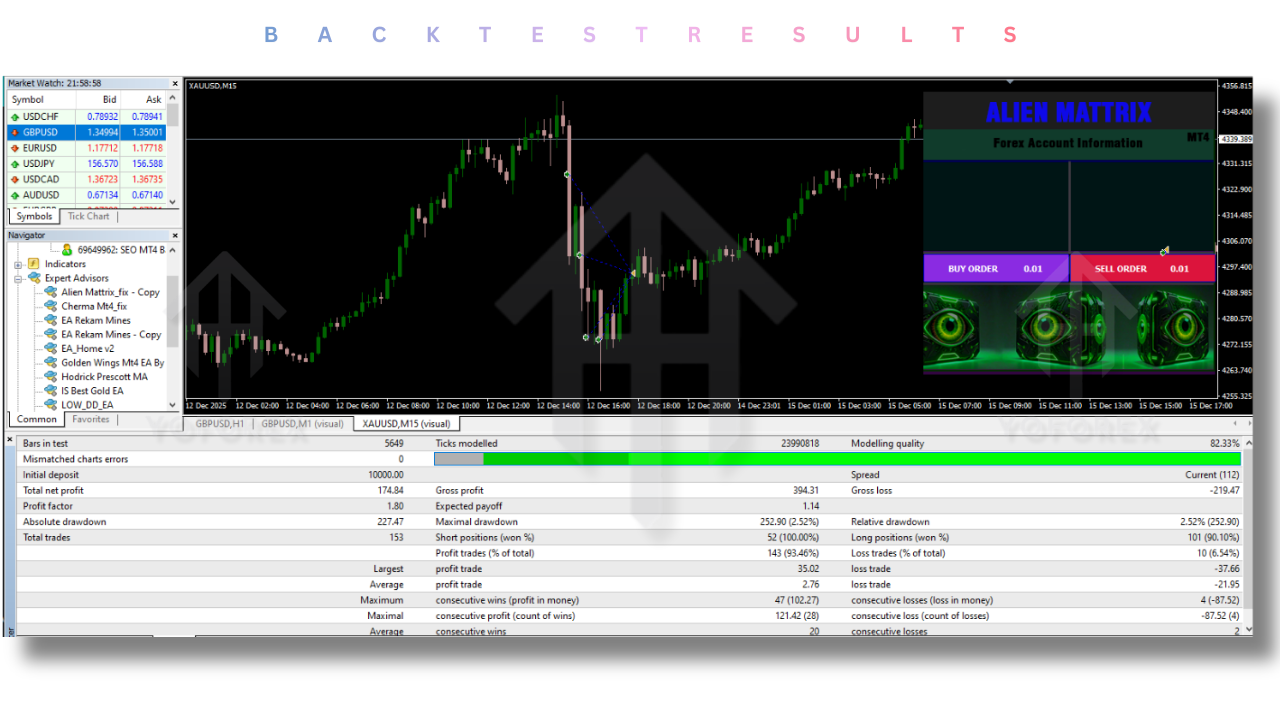
The description states that performance was verified on a $100 account, producing a reported total profit of $12,700 over 6 months.
Here’s the honest and professional way to treat this information:
-
It’s a reported/verified result (as described), but it is not a guarantee.
-
Market conditions change, spreads vary by broker, and execution quality differs.
-
Past performance does not predict future returns.
So, treat this as a marketing/performance highlight—not as a promise of what you will earn.
Trading Style and Strategy Behavior
Alien Mattrix EA is described as versatile—able to work in both:
1) Scalping Conditions
On M15, “scalping” usually means short holding times or smaller targets when micro-moves appear. A gold scalper EA typically benefits from:
-
Low spreads
-
Fast execution
-
Stable broker feed
-
Minimal slippage during high volatility
If your broker widens spreads during news, any scalping logic can be impacted.
2) Trend Trading Conditions
Trend trading logic generally focuses on larger directional moves and can hold positions longer. If Alien Mattrix EA truly adapts between scalping and trend behavior, that means it may:
-
Reduce activity in choppy phases
-
Increase trade confidence during directional pushes
-
Use trade management rules that follow momentum
In practical use, this flexibility can be helpful—because XAUUSD doesn’t stay in one behavior all week.
Key Features of Alien Mattrix EA (Major Highlights)
Fully Automated Trading
Once installed on MT4 and attached to the XAUUSD M15 chart, the EA can monitor and trade automatically. That means you don’t need manual entry, and you reduce emotional interference.
Algorithmic Market Analysis
The EA is designed to read market conditions using built-in logic. Instead of trading randomly, it attempts to identify direction and timing using trend/momentum detection.
Risk Management Support
The EA claims to “manage risk effectively.” In practical terms, a strong EA should allow you to control:
-
Lot sizing
-
Trade frequency
-
Maximum risk exposure
-
Stop-loss / take-profit behavior (if included)
-
Safety filters (spread, time filters, drawdown limits if available)
Even if the EA is “automatic,” the risk settings you choose decide whether it trades safely or aggressively.
Works Across Market Conditions
Gold can range for hours and then break out violently. An EA that survives long-term usually includes logic to avoid poor conditions (like random chop) and focus on cleaner movement.
Who Should Use Alien Mattrix EA?
Alien Mattrix EA is suitable for:
-
Busy traders who can’t monitor charts all day
-
Beginners who want rule-based trading execution (but must still understand risk)
-
Small account traders starting from $100 (with conservative lot size)
-
Gold-focused traders who want an MT4 automation solution
-
Strategy testers who want to forward-test performance on demo/cent accounts first
If you’re expecting “no loss” trading, this is not realistic. But if you want structured automation with consistent execution, Alien Mattrix EA is positioned as a solid candidate to test.

Recommended Setup Tips (For Better Stability)
To get the best behavior from a gold EA on MT4, keep these practical points in mind:
-
Use a low-spread broker environment for XAUUSD
-
Avoid running during extreme news volatility unless the EA specifically supports news filters
-
Run on a VPS if you want 24/7 stable execution
-
Keep MT4 connected with stable internet
-
Backtest + forward test before risking larger capital
-
Start with conservative parameters, then scale responsibly
How to Install Alien Mattrix EA on MT4
-
Download the EA file (usually
.ex4) -
Open MT4 → File → Open Data Folder
-
Go to MQL4 → Experts and paste the file
-
Restart MT4
-
Open XAUUSD chart → set M15 timeframe
-
Drag & drop Alien Mattrix EA onto chart
-
Enable AutoTrading
-
In settings, verify lot size, risk controls, and any filters
Risk Disclaimer (Read This)
Trading is risky. Even with automation, losses are possible—especially on volatile instruments like gold. An EA can reduce emotional errors, but it cannot eliminate risk. Always:
-
Test on demo first
-
Use proper risk management
-
Avoid overleveraging a small balance
-
Understand that market conditions can change suddenly
Support, Help & Disclaimer
If you need help installing or face any bugs, feel free to reach out on:
WhatsApp: https://wa.me/+443300272265
Telegram Group: https://t.me/yoforexrobot
Final Verdict
Alien Mattrix EA V1.0 MT4 is a gold-focused automated trading robot designed for the XAUUSD M15 chart with a low starting deposit requirement of $100. It is presented as a versatile EA that can function in both scalping and trend conditions, and it promotes a strong performance claim based on a small account.
If you want an automated approach to gold trading and you prefer MT4 execution, Alien Mattrix EA is worth forward-testing—especially if you focus on conservative risk settings and stable broker conditions.