Traders considering an automated gold system usually need clear answers before spending money. Does the EA match their platform and account type? What capital and risk structure does it actually require? How does its multi-strategy and grid approach behave in real conditions? And is it worth testing further?
Devils Contract EA V2.23 is a fully automated Multi-Strategy Expert Advisor for MetaTrader 5, built specifically for XAUUSD. It is listed on the MQL5 Market and also appears in marketplaces such as YoForex.org. This article focuses on the practical buying decision so you can decide whether it fits your setup.
What Is Devils Contract EA V2.23 MT5?
Devils Contract is a MetaTrader 5 Expert Advisor developed for trading XAUUSD (Gold vs US Dollar). Version 2.23 combines up to 36 internal trading strategies inside one shared execution, grid, basket, and risk-management framework.
Instead of relying on a single entry model, different modules look for trend-following, momentum, breakout/retest, mean-reversion, liquidity/rejection, volatility, session-based, and multi-timeframe conditions. All of them feed into the same grid and basket management system.
It is sold as a commercial product (listed at 200 USD on MQL5) with a free demo available.
Who Is Looking for a Bot Like Devils Contract EA V2.23 MT5?
This EA typically attracts:
- MT5 traders focused on XAUUSD automation.
- Traders who want a multi-strategy approach rather than a single-logic scalper or trend follower.
- Users comfortable with grid and basket management who understand the associated drawdown risk.
- Busy traders seeking 24/5 automated execution on gold with news filtering and drawdown controls.
- Buyers comparing gold EAs who specifically need a hedging-account compatible system.
It is not aimed at pure MT4 users, netting-account traders, or those seeking a simple non-grid single-position system.
How Devils Contract EA V2.23 Works
The EA is attached to an XAUUSD M1 chart. Initial entry signals are primarily evaluated on closed M1 candles. Selected strategies also use higher timeframes (M5 and M15) internally for trend, structure, volatility, or momentum confirmation.
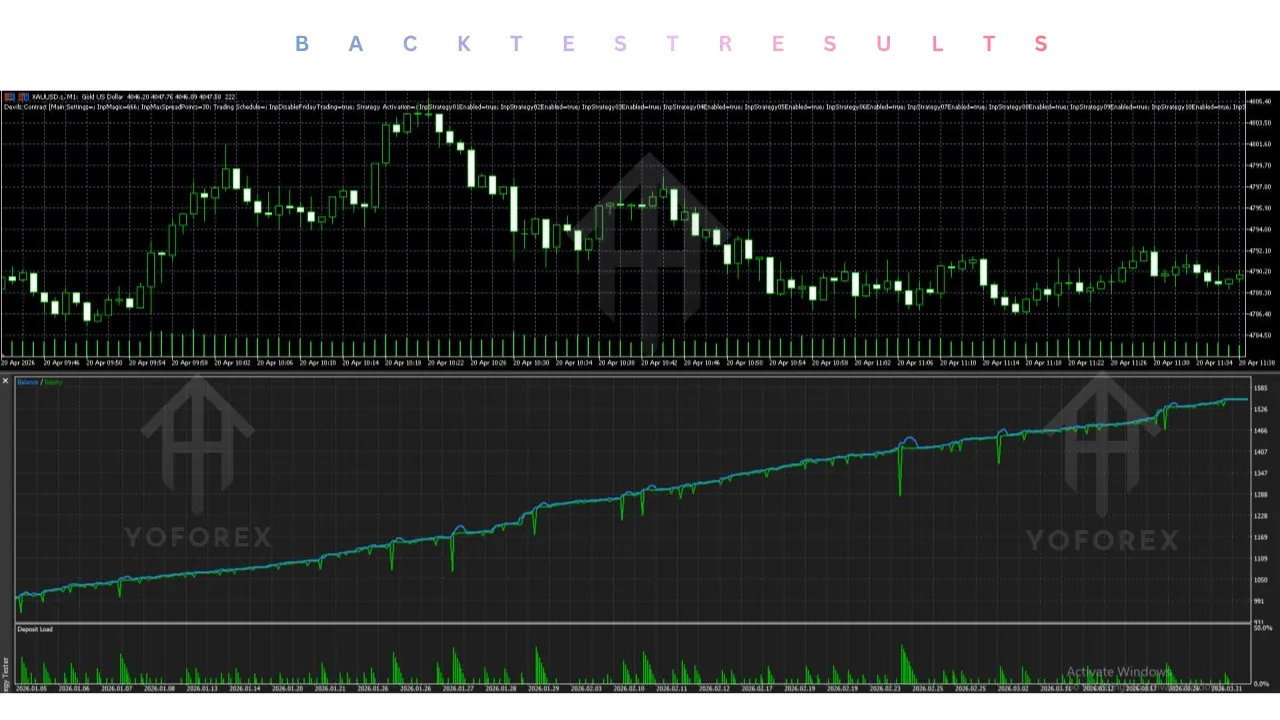
Once a valid signal appears and spread conditions are met, the EA opens a position. If price moves against it, the integrated grid system can add further positions in the same direction at progressive distances. All open positions are managed together as a basket with shared profit-taking and virtual basket trailing.
Key verified mechanics include:
- No automatic Martingale lot multiplier.
- Progressive grid distance expansion (base 250 normalized gold points, factor 1.20).
- Virtual basket trailing (starts 120 points above average entry, trails 80 points).
- Magic Number-based drawdown protection (default 30% with trading pause).
- Integrated high-impact USD news filter (30 minutes before/after).
- Spread filter (default 30 normalized points).
- Auto Lot (~0.01 lot per 1,000 USD) or Fixed Lot modes.
The system must remain running continuously for grid management, trailing, and news filtering to function correctly.
Quick Buyer Snapshot
| Factor | Details |
|---|---|
| Platform | MetaTrader 5 only |
| Strategy | Multi-strategy (up to 36 modules) + grid/basket |
| Trading Style | XAUUSD grid & basket management |
| Currency Pairs | XAUUSD (and common broker variants) |
| Timeframe | M1 chart (internal M5/M15 confirmations) |
| Risk Management | Drawdown protection, news filter, spread filter, progressive grid |
| Automation | Fully automated |
| Best For | MT5 gold traders comfortable with grid systems |
| Experience Level | Intermediate+ recommended |
| Account Type | MT5 Hedging account required |
| Capital | Technical min ~300 USD; recommended 1,000 USD+ |
Key Features Buyers Should Know
Multi-strategy engine (up to 36 modules) What it does: Different modules scan for varied market conditions and feed a shared system. Why a buyer may care: Reduces dependence on one market regime. What to verify: Which modules are active in the retail version and how they interact under strong trends.
Grid and basket management What it does: Adds positions at progressive distances and manages them as one basket with virtual trailing. Why a buyer may care: Aims to recover against-moves via basket profit. What to verify: Maximum expected grid depth, margin usage, and behavior in prolonged one-direction moves. Grid systems can produce significant drawdown.
XAUUSD-only design with symbol detection What it does: Recognizes common gold symbol names and normalizes point distances across broker formats. Why a buyer may care: Purpose-built for gold volatility. What to verify: Exact symbol name and contract specifications on your broker.
Hedging account requirement What it does: Designed for true MT5 hedging so individual positions remain separate. Why a buyer may care: Netting accounts can break intended basket logic. What to verify: Your broker account is set to hedging mode before installation.
Capital and lot sizing What it does: Auto Lot targets roughly 0.01 lot per 1,000 USD; Fixed Lot defaults to 0.01. Why a buyer may care: Directly affects risk and margin. What to verify: Your actual balance versus the recommended 1,000 USD minimum and the aggressive nature of the 300 USD technical floor.
Drawdown protection, news filter, and spread filter What it does: Closes the basket at a Magic Number drawdown limit (default 30%), blocks new entries around high-impact USD news, and skips entries when spread is too wide. Why a buyer may care: Built-in safety layers. What to verify: Default values versus your risk tolerance and whether the news URL is correctly allowed in MT5 WebRequest settings.
Information panel and VPS dependence What it does: Displays status, basket data, and filters on the chart. Requires continuous operation. Why a buyer may care: Visibility and reliability. What to verify: VPS quality and uptime, as virtual trailing and grid management stop if the terminal is offline.
Why Traders May Consider Devils Contract EA V2.23 MT5
Practical reasons include:
- Ready-made multi-strategy coverage of different gold market phases inside one EA.
- Automated grid/basket handling with progressive spacing and no Martingale multiplier.
- Built-in news, spread, and drawdown controls.
- Clear installation path on XAUUSD M1 with hedging accounts.
- Free demo availability for testing before purchase.
- Versioned product (2.23) with documented capital and broker guidance.
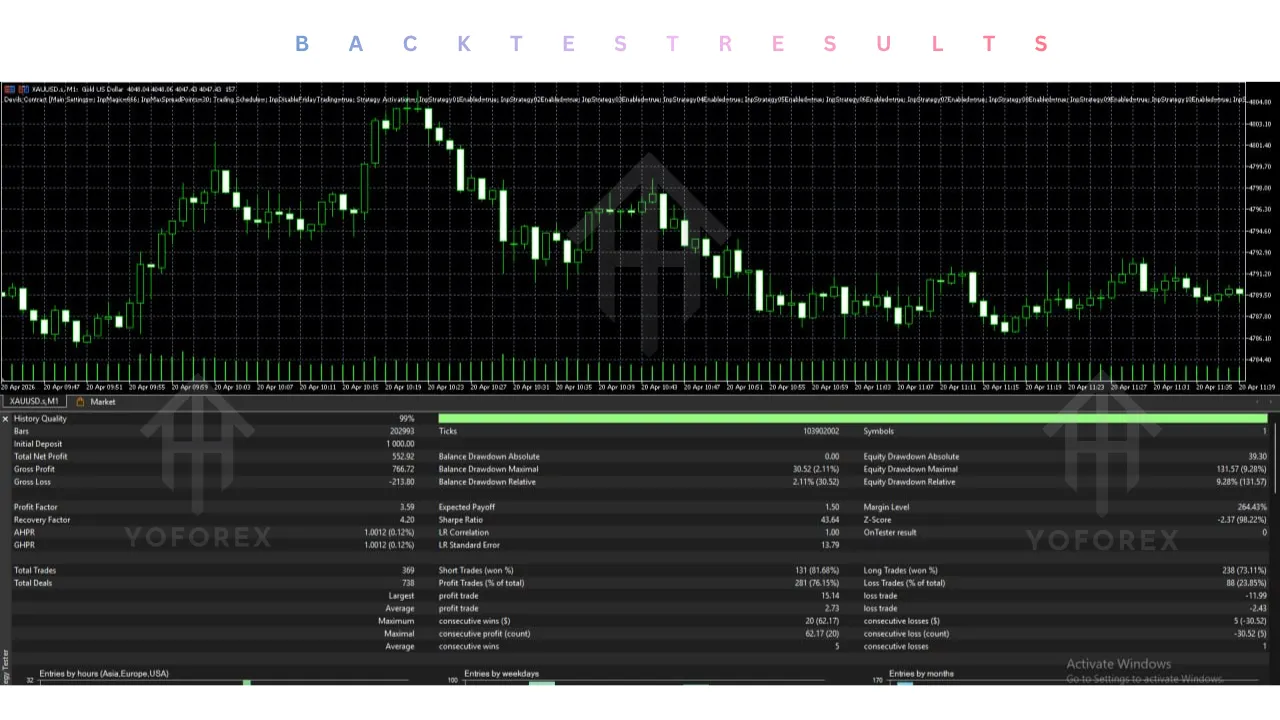
These are operational benefits only. They do not guarantee profits or protect against large adverse moves.
Who Is Devils Contract EA V2.23 Best For?
- Intermediate and experienced MT5 traders who understand grid systems and gold volatility.
- Traders with a genuine MT5 hedging account and at least the recommended 1,000 USD capital.
- Users prepared to run a stable VPS 24/5.
- Buyers willing to demo-test extensively and accept that grid drawdowns can be substantial.
- Gold-focused automated traders who prefer a multi-module approach over single-logic EAs.
Beginners can technically attach it, but the grid, capital, and risk requirements make it better suited to those who already grasp drawdown and margin implications.
Who Should Avoid Devils Contract EA V2.23 MT5?
- Traders using MT4 only or netting accounts.
- Anyone expecting guaranteed profits or zero drawdown.
- Accounts below the recommended capital who are not prepared for elevated risk at the technical minimum.
- Traders unwilling to keep the EA and terminal running continuously (VPS strongly recommended).
- Users who dislike or do not understand grid/basket systems.
- Anyone who will not test thoroughly on demo first.
Devils Contract EA V2.23 vs Manual Trading
| Factor | Devils Contract EA V2.23 MT5 | Manual Trading |
|---|---|---|
| Execution | Automated multi-strategy + grid | Trader decides every entry/exit |
| Monitoring | Requires continuous EA/VPS operation | Continuous personal chart watching |
| Consistency | Follows coded rules and filters | Subject to emotion and fatigue |
| Speed | Tick-level grid and basket management | Limited by human reaction |
| Human Emotion | Removed from individual decisions | Directly influences every trade |
| Flexibility | Limited to programmed modules and settings | Full discretionary adjustment |
| Setup Required | Hedging account, M1 chart, VPS, config | Analysis skills and discipline |
Both carry real risk of loss. The EA shifts the workload to setup, capital adequacy, and oversight.
Buyer Checklist — Before You Purchase
- Confirm the strategy modules and grid logic match your risk tolerance.
- Verify MT5 compatibility and that you are using a true hedging account.
- Check broker compatibility (low XAUUSD spreads, stable execution; recommended list includes VT Markets, IC Markets, Vantage, Roboforex, and others).
- Confirm the exact XAUUSD symbol name and contract specifications.
- Accept the M1 chart requirement and internal higher-timeframe usage.
- Review expected drawdown behavior under strong trends.
- Set risk settings (Auto Lot vs Fixed Lot, DD protection level) appropriately for your balance.
- Plan for a stable Windows VPS.
- Run realistic backtests (Every tick based on real ticks, variable spreads, commissions).
- Download the free demo and forward-test extensively.
- Confirm seller support channels and update policy.
- Check installation requirements (algorithmic trading enabled, news URL in WebRequest if needed).
- Ensure capital meets at least the recommended 1,000 USD level for more reasonable margin reserves.
How to Get Started
- Confirm you have MetaTrader 5 and a hedging account.
- Review the full product description and recommended brokers.
- Install the EA and attach it to an XAUUSD M1 chart.
- Configure Auto Lot or Fixed Lot conservatively and enable algorithmic trading.
- Add any required news URL to MT5 WebRequest settings.
- Test thoroughly on a demo account across different market conditions.
- Monitor basket behavior, drawdown, and filter activity.
- Only consider live trading with appropriate capital once you fully understand the risk profile.
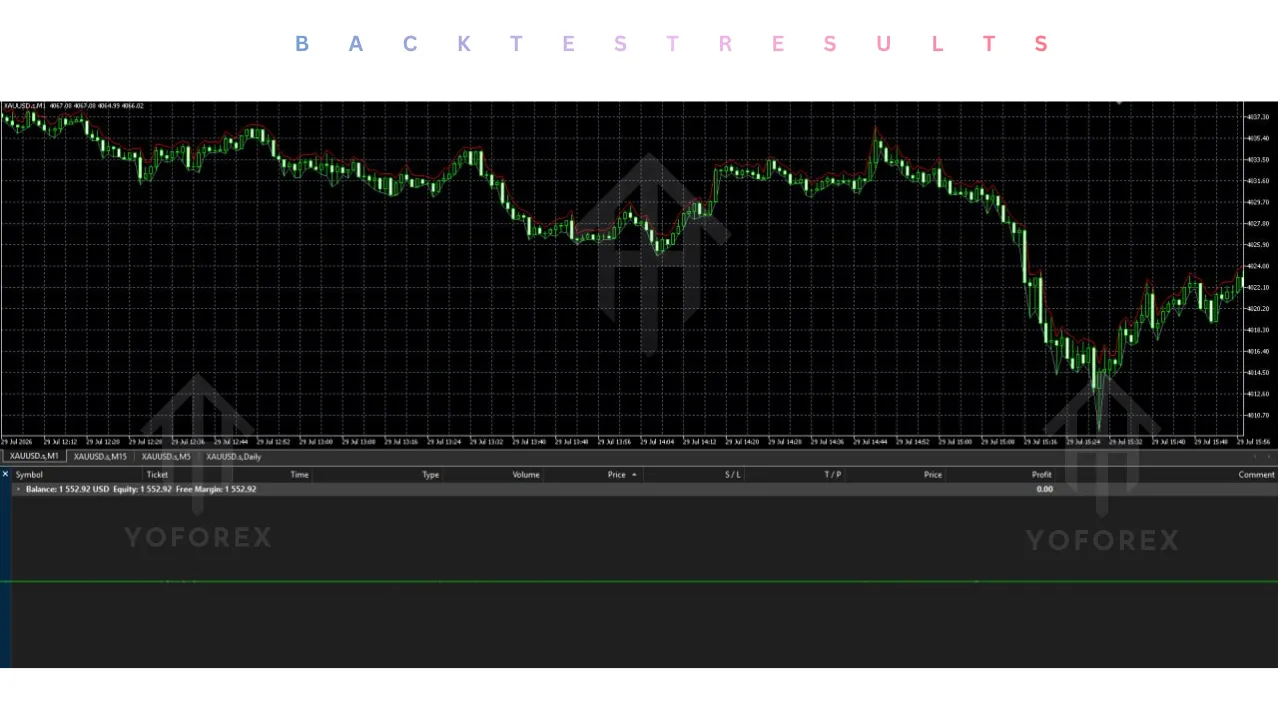
Never skip extended demo testing.
FAQs
Is Devils Contract EA V2.23 compatible with MT4 or MT5?
It is built exclusively for MetaTrader 5.
Is Devils Contract EA suitable for beginners?
It can be installed by beginners, but the grid system, capital requirements, and hedging-account need make it better suited to traders who already understand these risks.
What should I check before buying Devils Contract EA V2.23?
Hedging account type, capital adequacy, broker XAUUSD conditions, grid risk tolerance, VPS readiness, and thorough demo results.
Does Devils Contract EA require a VPS?
Yes, a stable VPS is strongly recommended because grid management, virtual trailing, and the news filter only operate while the terminal and EA are active.
Can Devils Contract EA be tested on a demo account?
Yes. A free demo is available. Always test before any live use.
What risks should buyers consider?
Grid systems can accumulate multiple positions and produce significant drawdown and margin usage during strong adverse moves. No protection is absolute. Slippage, spreads, and broker conditions also affect results.
Can the settings be customized?
Yes. Lot sizing mode, risk parameters, and filters are configurable. Review the full input list in the product documentation.
Where can I get Devils Contract EA V2.23 MT5?
It is available on the MQL5 Market and may also be offered through marketplaces such as YoForex.org. Always verify you are obtaining the official version 2.23.
Conclusion
If Devils Contract EA V2.23 MT5 matches your MT5 hedging account, XAUUSD focus, capital level, and willingness to manage a grid-based multi-strategy system, the practical next step is to review the complete specifications, download the free demo, and run proper testing. Confirm broker compatibility and risk settings yourself.
Automation can enforce rules and remove some emotional decisions, but it does not eliminate market risk or the need for careful evaluation. Complete the buyer checklist, test thoroughly, and only then decide whether to purchase and move toward live use.
Ready to evaluate Devils Contract EA V2.23 MT5?
Review the full specs, , and test it thoroughly before going live.
Support
If you need help installing or configuring your EA, or face any kind of bug, feel free to reach out on:
WhatsApp: Click here
Telegram Group: Join our community
Disclaimer:
Forex and gold trading involve risk. Past performance doesn’t guarantee future results. Always test robots on demo before live trading and use proper risk management.
REFERRAL
Join the VIP Signals Telegram Channel for real-time expert trading signals and stay ahead in the forex market. Get personalized strategies by becoming a part of our Real Account Management Telegram Channel and optimize your trading experience. If you’re aiming to Pass PropFirm Challenges , join our dedicated channel for tips and proven methods. Start managing your capital effectively with expert advice from our Funded Account Management Telegram Channel. For advanced traders, our HFT EA / Passing Telegram Channel offers high-frequency trading insights and strategies to boost your performance.